Ext JS iterator functions

July 23, 2009 by Ed Spencer · 20 Comments 

Ext JS has a number of handy iterator functions. Some, like Ext.each, you probably already know about, but there are a few others lurking around which can be useful in saving yourself a few lines of code. First, let’s recap Ext.each:

Ext.each

Ext.each applies a function to each member of an array. It’s basically a more convenient form of a for loop:

var people = ['Bill', 'Saul', 'Gaius'];

//using each to detect Cylons:
Ext.each(people, function(person, index) {
  var cylon = (index + 1) % 2 == 0; //every second man is a toaster
  alert(person + (cylon ? ' is ' : ' is not ') + 'a fraking cylon');
});

//is the same as
for (var i=0; i < people.length; i++) {
  var person = people[i];
  var cylon = (i + 1) % 2 == 0; //every second man is a toaster

  alert(person + (cylon ? ' is ' : ' is not ') + 'a frakin cylon');
};

Ext.iterate

Ext.iterate is like Ext.each for non-array objects. Use it wherever you would normally use a for .. in loop:

var ships  = {'Bill': 'Galactica', 'Laura': 'Colonial One'};

Ext.iterate(ships, function(key, value) {
  alert(key + "'s ship is the " + value);
});

//is the same as
for (key in ships) {
  var value = ships[key];
  alert(key + "'s ship is the " + value);
}

Using Ext.iterate with an array is the same as calling Ext.each. Each and Iterate both take an optional third parameter, which is the scope to run the function in. Another advantage over using the for construct is that you can easily reuse the same function:

var myFunction = function(item, index) {
  //does some clever thing
}

Ext.each(people, myFunction);
Ext.each(['another', 'array'], myFunction);

Ext.pluck

Ext.pluck grabs the specified property from an array of objects:

var animals = [
  {name: 'Ed', species: 'Unknown'},
  {name: 'Bumble', species: 'Cat'},
  {name: 'Triumph', species: 'Insult Dog'}
];

Ext.pluck(animals, 'species'); //returns ['Unknown', 'Cat', 'Insult Dog']
Ext.pluck(animals, 'name'); //returns ['Ed', 'Bumble', 'Triumph']

Ext.invoke

Invoke allows a function to be applied to all members of an array, and returns the results. Using our animals object from above:

var describeAnimal = function(animal) {
  return String.format("{0} is a {1}", animal.name, animal.species);
}

var describedAnimals = Ext.invoke(animals, describeAnimal);
console.log(describedAnimals); // ['Ed is a Unknown', 'Bumble is a Cat', 'Triumph is a Insult Dog'];

Ext.invoke performs a similar job to Ruby’s collect method in making it easy to transform arrays. Any additional arguments passed to the Ext.invoke call will be passed as arguments to your function, in this case the describeAnimal function. Obviously your functions will be much more grammatically accurate than mine.

Ext.partition

Ext.Partition splits an array into two sets based on a function you provide:

var trees = [
  {name: 'Oak',    height: 20},
  {name: 'Willow', height: 10},
  {name: 'Cactus', height: 5}
];

var isTall = function(tree) {return tree.height > 15};

Ext.partition(trees, isTall);

//returns:
[
  [{name: 'Oak', height: 20}],
  [{name: 'Willow', height: 10}, {name: 'Cactus', height: 5}]
]

The partition call above returns a 2-dimensional array with the first element containing all of the items for which the function returned true (tall trees in this case), and the second containing items for which the function return false.

Math functions

Finally, we have some simple math-related functions:

var numbers = [1, 2, 3, 4, 5];
Ext.min(numbers); //1
Ext.max(numbers); //5
Ext.sum(numbers); //15
Ext.mean(numbers); //3

While the built in functions don’t cater for all situations, they’re useful to have and to know about, and usually offer a more elegant approach than using the ‘for’ keyword.

ExtJS Solitaire

January 13, 2009 by Ed Spencer · 2 Comments 

Update: We recently released the updated Touch Solitaire for Sencha Touch.
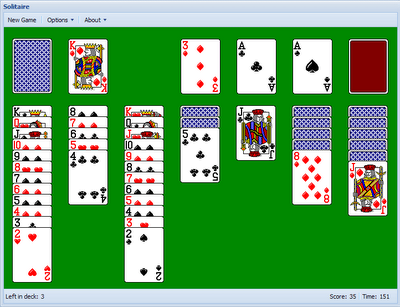

For a bit of fun over Christmas I thought I’d try my hand at writing Solitaire using the ExtJS library. The results of my efforts can be seen over at http://solitaire.edspencer.net.

It’s reasonably complete, with the familiar drag and drop moving of cards (and stacks of cards). Most of the interface is custom built, with classes representing Cards, Stacks, the Pack, etc. The main motivation for creating this is to give a real-world example of using Drag and Drop with Ext JS, as documentation for it can be hard to come by. The full source of the game can be found on github, and I encourage people to take a look at and/or improve the code if they wish.

A few stats: the game comes to 1300 lines of code, including generous comments and whitespace. It’s 15k minified, and uses a custom Ext build. It took roughly 25 hours to put together, which was mostly spent researching how to use Ext’s many D&D classes.

The reason I’m releasing it now is that I’m currently working on a much larger, more exciting open source ExtJS project which I want to concentrate on before releasing. If anyone wants to pick this up feel free to fork the code on Github or get in touch in the comments or in #extjs on IRC.

Cleaning up an example Ext JS form

August 8, 2008 by Ed Spencer · 7 Comments 

One of my recent Ext JS forms had a section which looked like this:

items: [
  new Ext.Button({
    text: 'Preview Video',
    iconCls: 'play',
    handler: function() {
      var win;

      if (!win) {
        win = new Ext.Window({
          title: 'Preview Video',
          modal: true,
          height: 377,
          width: 368,
          items: [
            new Ext.Panel({
              autoLoad: '/admin/videos/' + video_id + '/preview.html'
            })
          ],
          buttons: [
            {
              text: 'OK',
              handler: function() {
                win.close();
              }
            }
          ]
        });

      };
      win.show();

    }
  })
]

Not horrific but not nice either – let’s DRY this up. It’s not too pleasant to read but all it’s really doing is rendering a customised Ext.Button which opens up a modal Ext.Window, in which is loaded the contents of a known url.

Ok so let’s start with that Window. First, we’ll make a subclass of Ext.Window:

/**
 * AdFunded.views.Video.PreviewWindow
 * @extends Ext.Window
 * A simple Preview window for the given video_id
 */
AdFunded.views.Video.PreviewWindow = function(config) {
  var config = config || {};

  Ext.applyIf(config, {
    title: 'Preview Video',
    modal: true,
    height: 377,
    width: 368,
    items: [
      new Ext.Panel({
        autoLoad: '/admin/videos/' + config.video_id + '/preview.html'
      })
    ],
    buttons: [
      {
        text: 'OK',
        scope: this,
        handler: function() {
          this.window.close();
        }
      }
    ]
  });

  AdFunded.views.Video.PreviewWindow.superclass.constructor.call(this, config);

  this.window = this;
};
Ext.extend(AdFunded.views.Video.PreviewWindow, Ext.Window);
Ext.reg('video_preview_window', AdFunded.views.Video.PreviewWindow);

Note the namespacing employed above – within an Ext MVC framework I have been developing across several projects for the last few months, all views follow this structure. AdFunded is the name of the application. The precise structure doesn’t matter here, but using a namespace for each app does.

So we’ve taken the Window setup out of our view now, which leaves us with:

items: [
  new Ext.Button({
    text: 'Preview Video',
    iconCls: 'play',
    handler: function() {
      var win;

      if (!win) {
        win = new AdFunded.views.Video.PreviewWindow({video_id: id});
      };
      win.show();

    }
  })
]

Great – we’ve gone from 34 lines in our view to 15, and scored ourselves a reusable Window component which we can call from anywhere in the app. Nice work, but there’s more to come… If we’re going to use the Preview Window again, we’ll probably need to use that Preview Button again too. Let’s see:

/**
 * AdFunded.views.Video.PreviewButton
 * @extends Ext.Button
 * Displays a Preview Window for the given video_id
 */
AdFunded.views.Video.PreviewButton = function(config) {
  var config = config || {};

  Ext.applyIf(config, {
    text: 'Preview Video',
    iconCls: 'play',
    handler: function() {
      var win = new AdFunded.views.Video.PreviewWindow({video_id: config.video_id});
      win.show();
    }
  });

  AdFunded.views.Video.PreviewButton.superclass.constructor.call(this, config);
};
Ext.extend(AdFunded.views.Video.PreviewButton, Ext.Button);
Ext.reg('video_preview_button', AdFunded.views.Video.PreviewButton);

Which leaves us with the following the the view:

items: [
  {
    xtype: 'video_preview_button',
    video_id: id
  }
]

We’ve now gone from 34 lines to 6 (in the view at least), but the point is not about cutting out lines of code – it’s creating reusable components. We’ve added 20 lines overall this way but we now have two extra components that we can call on at any time (with minimal lines of code), safe in the knowledge that they will provide a consistent experience each time.