Sencha Touch 2 Hits Beta

February 1, 2012 by Ed Spencer · 2 Comments 

Earlier today we released Sencha Touch 2 Beta 1 – check out the official sencha.com blog post and release notes to find out all of the awesome stuff packed into this release.

This is a really important release for us – Sencha Touch 2 is another huge leap forward for the mobile web and hitting beta is a massive milestone for everyone involved with the project. From a personal standpoint, working on this release with the amazing Touch team has been immensely gratifying and I hope the end result more than meets your expectations of what the mobile web can do.

While you should check out the official blog post and release notes to find out the large scale changes, there are a number of things I’d really like to highlight today.

A Note on Builds

Before we get into the meat of B1 itself, first a quick note that we’ve updated the set of builds that we generate with the release. Previously there had been some confusion around which build you should be using in which circumstances so we’ve tried to simplify that.

Most people, most of the time should be using the new sencha-touch-debug.js while developing their app as it is unminified code that contains all of the debug warnings and comments. If you’re migrating from 1.x, use the new builds/sencha-touch-all-compat.js build as it provides an easier migration path by logging additional warnings when you use 1.x-style class configurations.

Because we provide 5 builds in total we created a guide on the shipped builds and JSBuilder (the tool that creates a custom build specifically for your app). The guide contains a table showing all of the options enabled for each build – hopefully that makes it easy to choose which build is best for your needs.

Performance

In case you haven’t seen Sencha Touch 2 yet the first thing you need to know is that it’s fast. Crazy fast. Check out this side by side comparison between 1.x and 2.x:

Layout performance is enormously faster in 2.x due to a brand new layout engine that operates much closer to the browser’s optimized CSS layout engine. The difference is pretty startling, especially on Android devices, which had sometimes struggled with Sencha Touch 1. Performance remains a top priority for us and we’re really pleased with the improvements that we’ve secured with 2.0.

Navigation View

The new Navigation View is one of the slickest, sexiest things we’ve created for 2.0. I could play with this thing all day. If you’ve got a phone in your pocket or a tablet near by open up the Navigation View example and see it for yourself. If you’re not, check out this beautiful video of it in action:


Navigation Views are really easy to put together and make your application immediately come to life. Check out the Navigation View docs to see how easy it is to add this to your own applications.

Awesome new examples

As of beta 1 we have 24 examples shipped with the SDK, including no fewer than 6 MVC examples – Kitchen Sink, Jogs with Friends, Twitter, Kiva, Navigation View and GeoCongress.

The Kitchen Sink and Twitter examples also take advantage of Device Profiles, which are a powerful way to customize your app to render customized UI for tablets and phones. Take a look at the Kitchen Sink on your phone and on an iPad to see how it rearranges itself depending on the screen size.

Finally, if you’re seeing Sencha Touch 2 for the first time you may not have seen the new inline examples in the documentation center. This is a brand new thing for Sencha Touch and allows you to edit code live on the documentation page and immediately see the results – give it a go on the Carousel docs.

Ludicrous Amounts of Documentation

Speaking of docs, we have a stunning amount of learning material for Sencha Touch 2. We’ve been through all of the major classes, making sure that the functions are clearly documented and that each one has some great intro text that describes what the class does and how it fits in with the rest of the framework.

We’ve also created over 20 brand new guides for Sencha Touch 2, covering everything from getting started through to developing using MVC, using Components and creating custom builds for your applications. We’ve put a huge amount of effort into our docs for Sencha Touch 2 and I really hope it pays off for you guys and makes it easier than ever to create great mobile web apps.

Go Build Something

It’s only beta 1 but we’re very happy with the performance, stability, API and documentation of Sencha Touch 2. I think it’s the best thing we’ve ever created, and really highlights what the mobile web is capable of. 2012 looks set to be a very exciting year for Sencha Touch so I hope you’ll join us on the adventure and build something amazing with it.

Download Sencha Touch 2 Beta 1 Now

The Class System in Sencha Touch 2 – What you need to know

January 28, 2012 by Ed Spencer · 2 Comments 

Sencha Touch 1 used the class system from Ext JS 3, which provides a simple but powerful inheritance system that makes it easier to write big complex things like applications and frameworks.

With Sencha Touch 2 we’ve taken Ext JS 4’s much more advanced class system and used it to create a leaner, cleaner and more beautiful framework. This post takes you through what has changed and how to use it to improve your apps.

Syntax

The first thing you’ll notice when comparing code from 1.x and 2.x is that the class syntax is different. Back in 1.x we would define a class like this:

MyApp.CustomPanel = Ext.extend(Ext.Panel, {
    html: 'Some html'
});

This would create a subclass of Ext.Panel called MyApp.CustomPanel, setting the html configuration to ‘Some html’. Any time we create a new instance of our subclass (by calling new MyApp.CustomPanel()), we’ll now get a slightly customized Ext.Panel instance.

Now let’s see how the same class is defined in Sencha Touch 2:

Ext.define('MyApp.CustomPanel', {
    extend: 'Ext.Panel',

    config: {
        html: 'Some html'
    }
});

There are a few changes here, let’s go through them one by one. Firstly and most obviously we’ve swapped out Ext.extend for Ext.define. Ext.define operates using strings – notice that both ‘MyApp.CustomPanel’ and ‘Ext.Panel’ are now wrapped in quotes. This enables one of the most powerful parts of the new class system – dynamic loading.

I actually talked about this in a post about Ext JS 4 last year so if you’re not familiar you should check out the post, but in a nutshell Sencha Touch 2 will automatically ensure that the class you’re extending (Ext.Panel) is loaded on the page, fetching it from your server if necessary. This makes development easier and enables you to create custom builds that only contain the class your app actually uses.

The second notable change is that we’re using a ‘config’ block now. Configs are a special thing in Sencha Touch 2 – they are properties of a class that can be retrieved and updated at any time, and provide extremely useful hook functions that enable you to run any custom logic you like whenever one of them is changed.

Whenever you want to customize any of the configurations of a subclass in Sencha Touch 2, just place them in the config block and the framework takes care of the rest, as we’ll see in a moment.

Consistency

The biggest improvement that comes from the config system is consistency. Let’s take our MyApp.CustomPanel class above and create an instance of it:

var myPanel = Ext.create('MyApp.CustomPanel');

Every configuration has an automatically generated getter and setter function, which we can use like this:

myPanel.setHtml('New HTML');
myPanel.getHtml(); //returns 'New HTML'

This might not seem much, but the convention applies to every single configuration in the entire framework. This eliminates the guesswork from the API – if you know the config name, you know how to get it and update it. Contrast this with Sencha Touch 1 where retrieving the html config meant finding some property on the instance, and updating it meant calling myPanel.update(’New HTML’), which is nowhere near as predictable.

Instantiating

You probably noticed that we used a new function above – Ext.create. This is very similar to just calling ‘new MyApp.CustomPanel()’, with the exception that Ext.create uses the dynamic loading system to automatically load the class you are trying to instantiate if it is not already on the page. This can make life much easier when developing your app as you don’t have to immediately manage dependencies – it just works.

In the example above we just instantiated a default MyApp.CustomPanel but of course we can customize it at instantiation time by passing configs into Ext.create:

var myPanel = Ext.create('MyApp.CustomPanel', {
    html: 'Some Custom HTML'
});

We can still call getHtml() and setHtml() to retrieve and update our html config at any time.

Subclassing and Custom Configs

We created a simple subclass above that provided a new default value for Ext.Panel’s html config. However, we can also add our own configs to our subclasses:

Ext.define('MyApp.CustomPanel', {
    extend: 'Ext.Panel',

    config: {
        html: 'Some html',
        anotherConfig: 'default value'
    }
});

The ‘anotherConfig’ configuration doesn’t exist on Ext.Panel so it’s defined for the first time on MyApp.CustomPanel. This automatically creates our getter and setter functions for us:

var myPanel = Ext.create('MyApp.CustomPanel');
myPanel.setAnotherConfig('Something else');
myPanel.getAnotherConfig(); //now returns 'Something else'

Notice how the getter and setter names were automatically capitalized to use camelCase like all of the other functions in the framework. This was done automatically, but Sencha Touch 2 does another couple of very nice things for you – it creates hook functions:

Ext.define('MyApp.CustomPanel', {
    extend: 'Ext.Panel',

    config: {
        html: 'Some html',
        anotherConfig: 'default value'
    },

    applyAnotherConfig: function(value) {
        return "[TEST] " + value;
    },

    updateAnotherConfig: function(value, oldValue) {
        this.setHtml("HTML is now " + value);
    }
});

We’ve added two new functions to our class – applyAnotherConfig and updateAnotherConfig – these are both called when we call setAnotherConfig. The first one that is called is applyAnotherConfig. This is passed the value of the configuration (’default value’ by default in this case) and is given the opportunity to modify it. In this case we’re prepending “[TEST] ” to whatever anotherConfig is set to:

var myPanel = Ext.create('MyApp.CustomPanel');
myPanel.setAnotherConfig('Something else');
myPanel.getAnotherConfig(); //now returns '[TEST] Something else'

The second function, updateAnotherConfig, is called after applyAnotherConfig has had a chance to modify the value and is usually used to effect some other change – whether it’s updating the DOM, sending an AJAX request, or setting another config as we do here.

When we run the code above, as well as ‘[TEST] ‘ being prepended to our anotherConfig configuration, we’re calling this.setHtml to update the html configuration too. There’s no limit to what you can do inside these hook functions, just remember the rule – the apply functions are used to transform new values before they are saved, the update functions are used to perform the actual side-effects of changing the value (e.g. updating the DOM or configuring other classes).

How we use it

The example above is a little contrived to show the point – let’s look at a real example from Sencha Touch 2’s Ext.Panel class:

applyBodyPadding: function(bodyPadding) {
    if (bodyPadding === true) {
        bodyPadding = 5;
    }

    bodyPadding = Ext.dom.Element.unitizeBox(bodyPadding);

    return bodyPadding;
},

updateBodyPadding: function(newBodyPadding) {
    this.element.setStyle('padding', newBodyPadding);
}

Here we see the apply and update functions for the bodyPadding config. Notice that in the applyBodyPadding function we set a default and use the framework’s unitizeBox function to parse CSS padding strings (like ‘5px 5px 10px 15px’) into top, left, bottom and right paddings, which we then return as the transformed value.

The updateBodyPadding then takes this modified value and performs the actual updates – in this case setting the padding style on the Panel’s element based on the new configuration. You can see similar usage in almost any component class in the framework.

Find out more

This is just a look through the most important aspects of the new class system and how they impact you when writing apps in Sencha Touch 2. To find out more about the class system we recommend taking a look at the Class System guide and if you have any questions the forums are a great place to start.

Sencha Touch 2 – Thoughts from the Trenches

October 11, 2011 by Ed Spencer · 8 Comments 

As you may have seen, we put out the first public preview release of Sencha Touch 2 today. It only went live a few hours ago but the feedback has been inspiring so far. For the full scoop see the post on the sencha.com blog. A few thoughts on where we are with the product:

Performance

Performance on Android devices in particular is breathtaking. I never thought I’d see the day where I could pick up an Android 2.3 device and have it feel faster than an iPhone 4, and yet that’s exactly what Sencha Touch 2 brings to the table. I recorded this short video on an actual device to show real world performance:

Now try the same on Sencha Touch 1.x (or any other competing framework) and (if you’re anything like me) cringe at what we were accustomed to using before. That video’s cool, but the one that’s really driving people wild is the side by side comparison of the layout engines in 1.x and 2.x.

Getting our hands on a high speed camera and recording these devices at 120fps was a lot of fun. Slowing time down to 1/4 of normal speed shows just how much faster the new layout engine is than what we used to have:

The most amazing part here is that we actually finish laying out *before* the phone’s rotation animation has completed. Skipping through the video frame by frame there are at least 5 frames where the app is fully laid out and interactive while the phone’s rotation animation is still running. Beating the phone’s own rotation speed is the holy grail – it’s not possible to make it any faster.

Documentation

I’ll admit it, I’m fanatical about great documentation. I’m sure I drive everyone else on the team crazy but I think it’s worth it. This is only a preview release but it already contains by far the best, most complete documentation we’ve ever shipped in an initial release.

In fact, the team’s worked so hard on documenting classes that it’s probably better than the (already good) Ext JS 4 docs. Naturally, this makes it time to further improve the Ext JS documentation.

We’ve added some awesome features here – lots of videos, 11 brand new guides and illustrations. My favourite new feature is definitely the inline examples with live previews though – seeing Sencha Touch running live in a phone/tablet right there in the docs is just amazing. Little gems like the live twitter feed in the bottom-most example in the DataView docs really sell just how easy it is to configure these components.

We set a high bar for this though. We’ve gone from woeful documentation in 1.x to good documentation in 2.x, but what we’re shooting for is excellence. We’ll continue to round out our content over coming weeks, and have a few new features rolling out soon that will raise the bar once again.

Onwards

We have a few features left to implement, which is why we’re calling this preview and not beta. Probably the biggest thing now is getting routing/deep linking back into the framework, along with a nice new syntax that I think you’ll find really easy to use. We’re also missing carousel animations and a handful of other things that will be going back in over the coming weeks. We have Sencha Con 2011 in just 12 days now though so we’ll share more details there.

Finally though, I want to thank everyone who participated in the closed preview phase, and for everyone sending their support and kind words on the blog, the forums and on twitter. We really appreciate all the great feedback and I hope we can exceed your expectations with a fast, polished, gorgeous 2.0 final!

Proxies in Ext JS 4

February 2, 2011 by Ed Spencer · 39 Comments 

One of the classes that has a lot more prominence in Ext JS 4 is the data Proxy. Proxies are responsible for all of the loading and saving of data in an Ext JS 4 or Sencha Touch application. Whenever you’re creating, updating, deleting or loading any type of data in your app, you’re almost certainly doing it via an Ext.data.Proxy.

If you’ve seen January’s Sencha newsletter you may have read an article called Anatomy of a Model, which introduces the most commonly-used Proxies. All a Proxy really needs is four functions – create, read, update and destroy. For an AjaxProxy, each of these will result in an Ajax request being made. For a LocalStorageProxy, the functions will create, read, update or delete records from HTML5 localStorage.

Because Proxies all implement the same interface they’re completely interchangeable, so you can swap out your data source – at design time or run time – without changing any other code. Although the local Proxies like LocalStorageProxy and MemoryProxy are self-contained, the remote Proxies like AjaxProxy and ScriptTagProxy make use of Readers and Writers to encode and decode their data when communicating with the server.

Proxy-Reader-and-Writer

Whether we are reading data from a server or preparing data to be sent back, usually we format it as either JSON or XML. Both of our frameworks come with JSON and XML Readers and Writers which handle all of this for you with a very simple API.

Using a Proxy with a Model

Proxies are usually used along with either a Model or a Store. The simplest setup is just with a model:

var User = Ext.regModel('User', {
    fields: ['id', 'name', 'email'],

    proxy: {
        type: 'rest',
        url : '/users',
        reader: {
            type: 'json',
            root: 'users'
        }
    }
});

Here we’ve created a User model with a RestProxy. RestProxy is a special form of AjaxProxy that can automatically figure out Restful urls for our models. The Proxy that we set up features a JsonReader to decode any server responses – check out the recent data package post on the Sencha blog to see Readers in action.

When we use the following functions on the new User model, the Proxy is called behind the scenes:

var user = new User({name: 'Ed Spencer'});

//CREATE: calls the RestProxy's create function because the user has never been saved
user.save();

//UPDATE: calls the RestProxy's update function because it has been saved before
user.set('email', 'ed@sencha.com');

//DESTROY: calls the RestProxy's destroy function
user.destroy();

//READ: calls the RestProxy's read function
User.load(123, {
    success: function(user) {
        console.log(user);
    }
});

We were able to perform all four CRUD operations just by specifying a Proxy for our Model. Notice that the first 3 calls are instance methods whereas the fourth (User.load) is static on the User model. Note also that you can create a Model without a Proxy, you just won’t be able to persist it.

Usage with Stores

In Ext JS 3.x, most of the data manipulation was done via Stores. A chief purpose of a Store is to be a local subset of some data plus delta. For example, you might have 1000 products in your database and have 25 of them loaded into a Store on the client side (the local subset). While operating on that subset, your user may have added, updated or deleted some of the Products. Until these changes are synchronized with the server they are known as a delta.

In order to read data from and sync to the server, Stores also need to be able to call those CRUD operations. We can give a Store a Proxy in the same way:

var store = new Ext.data.Store({
    model: 'User',
    proxy: {
        type: 'rest',
        url : '/users',
        reader: {
            type: 'json',
            root: 'users'
        }
    }
});

We created the exact same Proxy for the Store because that’s how our server side is set up to deliver data. Because we’ll usually want to use the same Proxy mechanism for all User manipulations, it’s usually best to just define the Proxy once on the Model and then simply tell the Store which Model to use. This automatically picks up the User model’s Proxy:

//no need to define proxy - this will reuse the User's Proxy
var store = new Ext.data.Store({
    model: 'User'
});

Store invokes the CRUD operations via its load and sync functions. Calling load uses the Proxy’s read operation, which sync utilizes one or more of create, update and destroy depending on the current Store delta.

//CREATE: calls the RestProxy's create function to create the Tommy record on the server
store.add({name: 'Tommy Maintz'});
store.sync();

//UPDATE: calls the RestProxy's update function to update the Tommy record on the server
store.getAt(1).set('email', 'tommy@sencha.com');
store.sync();

//DESTROY: calls the RestProxy's destroy function
store.remove(store.getAt(1));
store.sync();

//READ: calls the RestProxy's read function
store.load();

Store has used the exact same CRUD operations on the shared Proxy. In all of the examples above we have used the exact same RestProxy instance from three different places: statically on our Model (User.load), as a Model instance method (user.save, user.destroy) and via a Store instance (store.load, store.sync):

Proxy-reuse

Of course, most Proxies have their own private methods to do the actual work, but all a Proxy needs to do is implement those four functions to be usable with Ext JS 4 and Sencha Touch. This means it’s easy to create new Proxies, as James Pearce did in a recent Sencha Touch example where he needed to read address book data from a mobile phone. Everything he does to set up his Proxy in the article (about 1/3rd of the way down) works the same way for Ext JS 4 too.

Offline Apps with HTML5: A case study in Solitaire

June 21, 2010 by Ed Spencer · 11 Comments 

One of my contributions to the newly-launched Sencha Touch mobile framework is the Touch Solitaire game. This is not the first time I have ventured into the dizzying excitement of Solitaire game development; you may remember the wonderful Ext JS Solitaire from 18 months ago. I’m sure you’ll agree that the new version is a small improvement.
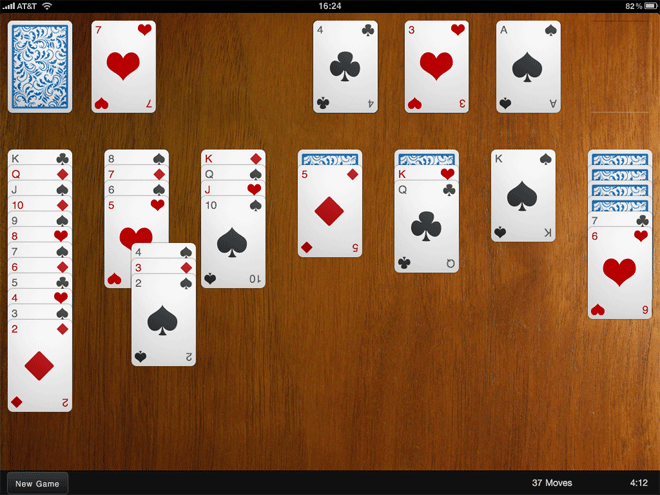
Solitaire is a nice example of a fun application that can be written with Sencha Touch. It makes use of the provided Draggables and Droppables, CSS-based animations, the layout manager and the brand new data package. The great thing about a game like this though is that it can be run entirely offline. Obviously this is simple with a native application, but what about a web app? Our goal is not just having the game able to run offline, but to save your game state locally too.

The answer comes in two parts:

Web Storage and the Sencha data package

HTML5 provides a brand new API called Web Storage for storing data locally. You can read all about it on my Web Storage post on Sencha’s blog but the summary is that you can store string data locally in the browser and retrieve it later, even if the browser or the user’s computer had been restarted in the meantime.

The crucial part of the sentence above is that we can only store string data. In the case of a game of Solitaire we need to store data on the elapsed time and number of moves as well as the location and status of each card. This doesn’t sound like the kind of data we want to manually encode into a string, so thankfully the data package comes to the rescue.

The Sencha Touch data package is a complete rewrite of the package that has been so successful in powering Ext JS 3.x. It shares many of the same philosophies and adds the learning we have gained from developing Ext JS 3.x over the past year. One of the new capabilities it offers us is a Local Storage proxy, which automatically marshalls your model data into local storage and transparently restores it when you need it.

Using the new proxy is simple – all we need to do is set up a new Store, specifying the Proxy and the Model that will be saved to it. Models are the spiritual successor to Ext JS 3.x’s Records. Now whenever we add, remove or update model instances in the store they are automatically saved to localStorage for us. Loading the store again is equally easy:

//set the store up
var gameStore = new Ext.data.Store({
    proxy: new Ext.data.LocalStorageProxy({
        id: 'solitaire-games'
    }),
    model: 'Game'
});

//saves all outstanding modifications, deletions or creations to localStorage
gameStore.sync();

//load our saved games
gameStore.read({
    scope: this,
    callback: function(records) {
        //code to load the first record
    }
});

And just like that we can save and restore games with Web Storage. We can visit our app’s webpage and start a game then come back later and find it automatically restored. But we still can’t play offline, for that we need the application cache.

The HTML5 Application Cache Manifest

The application cache is one of the best features of HTML5. It provides a simple (though sometimes frustrating) way of telling the browser about all of the files your application relies on so that it can download them all ready for offline use. All you have to do is create what’s known as a manifest file which lists all of the files the application needs – the Solitaire manifest looks like this:

CACHE MANIFEST
#rev49

resources/icon.png
resources/loading.png

resources/themes/wood/board.jpg
resources/themes/wood/cards.png

resources/css/ext-touch.css
resources/solitaire-notheme.css
resources/themes/wood/wood.css
resources/themes/metal/metal.css

ext-touch-debug.js
solitaire-all-debug.js

We tell the browser about the manifest file by pointing to it in the tag’s manifest atttibute. When the browser finds this file it downloads each of the listed assets so that they are ready for offline consumption. Note that it does not automatically include them on the page, you still need to do that yourself via the usual link and script tags. Here’s a snippet of the Solitaire index.html file:

<!doctype html>
<html manifest="solitaire.manifest">
    <head>
        <meta http-equiv="Content-Type" content="text/html; charset=utf-8">
        <title>Solitaire</title>

        <link rel="stylesheet" href="resources/css/ext-touch.css" type="text/css">
        <link rel="stylesheet" href="resources/solitaire-notheme.css" type="text/css">
        <link rel="stylesheet" href="resources/themes/wood/wood.css" type="text/css">

        <script type="text/javascript" src="ext-touch-debug.js"></script>
        <script type="text/javascript" src="solitaire-all-debug.js"></script>

Note the manifest file definition in the html element at the top, and the fact that we still include our page resources the normal way. It sounds easy, but without a little setup first it can be a very frustrating experience. Usually your browser will try to cache as many files as possible, including the manifest file itself – we don’t want this. As soon as your browser has a long-term cache of the manifest file it is extremely difficult to update your application – all of the files are already offline and won’t be updated, and the browser won’t even ask the server for an updated manifest file.

Preventing this behaviour turns out to be fairly easy, and the solution in its simplest form comes in the shape of a .htaccess file with contents like the following:

<Files solitaire.manifest>
    ExpiresActive On
    ExpiresDefault "access"
</Files>

This directs Apache to tell the browser not to cache the manifest file at all, instead requesting the file from the server on every page load. Note that if the device is currently offline it will use the last manifest file it received.

This is half the battle won, but let’s say you change one of your application files and reload – you’ll find nothing happened. This is because when your browser asked the server for the manifest file it actually asked if the file had changed or not. As the manifest itself wasn’t updated, the server responds with a 304 (Not Modified) and your browser keeps the old file.

To make the browser pick up on the change to the application file you need to update the manifest file itself. This is where the mysterious “#rev49″ comes in on the manifest example file above. This is a suggestion from the excellent diveintohtml5 article on the subject – whenever you change any application files just bump up the revision number in the manifest file and your browser will know to download the updated files.

One final detail is that your Apache server probably isn’t set up to server manifest files with the correct mime type, so be sure to add the following line to your Apache config and restart the server:

AddType text/cache-manifest .manifest

Wrapping it up

Offline access is a big deal for mobile apps and Sencha Touch makes them much easier to write. The benefit is not so much that the apps can run without an internet connection (many modern touch devices have a near-permanent connection to the internet already), but that web apps can now be treated as first-class citizens alongside native apps.

The fact that many devices allow your users to save your app to their home screen and load it as though it were native is an important step – you keep all of the advantages of web app deployment while gaining some of the benefits of native apps. As more and more native hardware APIs become available to web apps their importance will only grow.

If you want to check out Solitaire’s offline support for yourself visit the application’s site and save it to your iPad’s home page. Try turning on airplane mode and loading the app and see how it behaves as though it were native. If you don’t have an iPad, you can load the app in up-to-date versions of Chrome or Safari and get a similar experience.