herdctl logo

herdctl

Let Claude Code invoke itself.

Run agents on schedules, chat with them on Discord or Slack, and resume any session in your terminal. herdctl is an open-source orchestration layer that turns Claude Code into autonomous agents.

Quick Start
# Install herdctl globally
npm install -g herdctl

# Initialize your fleet
herdctl init

# Start your fleet
herdctl start

Talk to Your Agents Anywhere

Web, Slack, or Discord — wherever your team already works

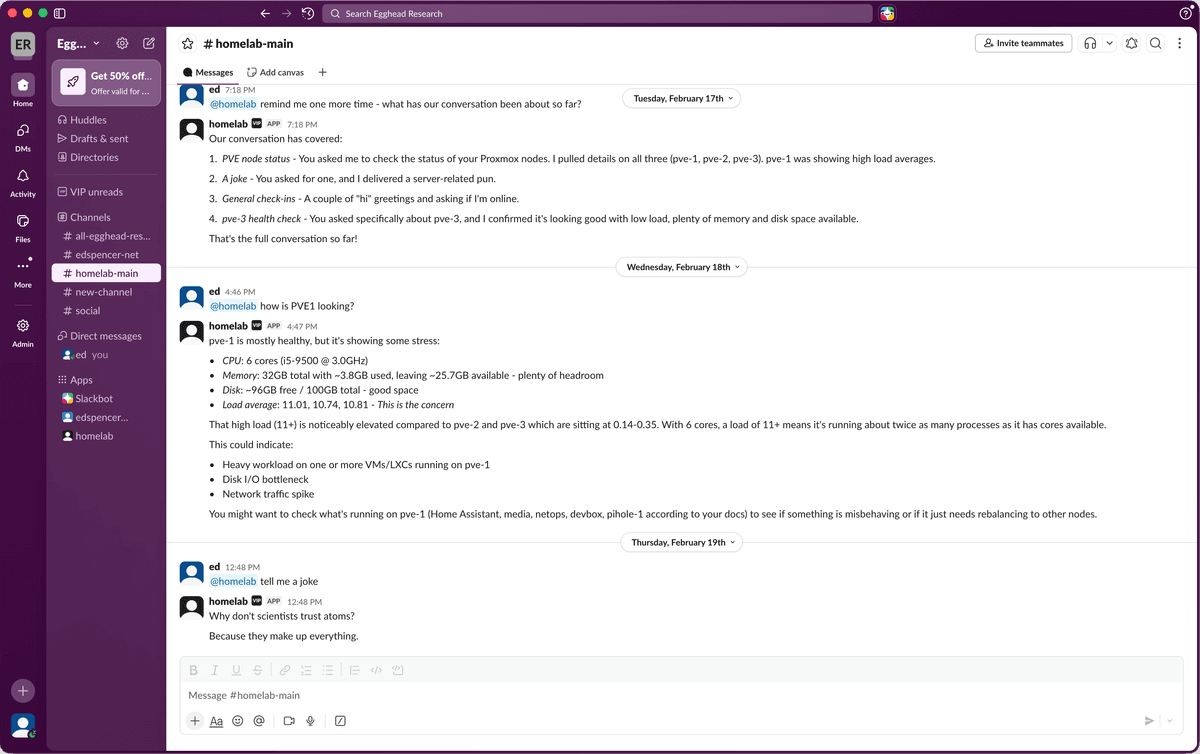
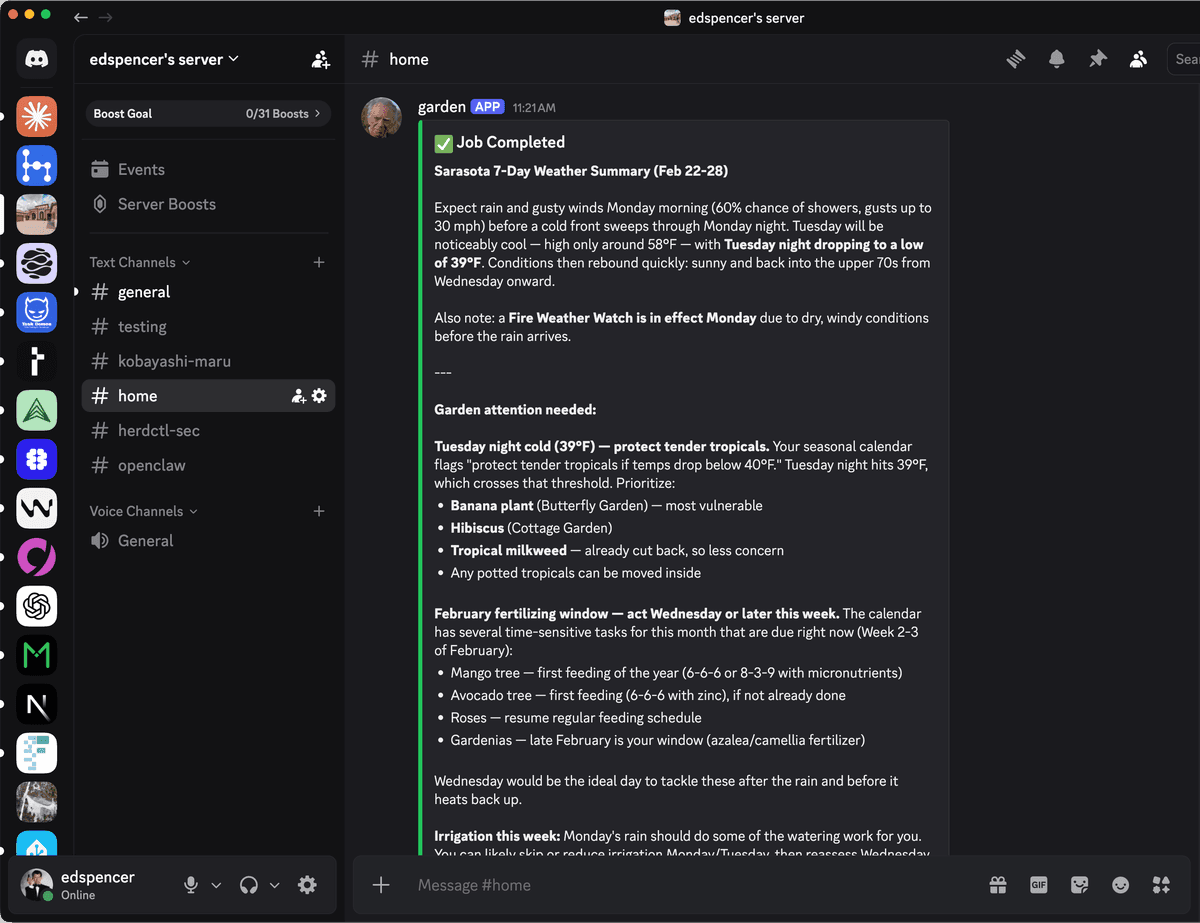
Chat with your agents through the built-in Web UI, Slack, or Discord. Send a message from your phone and pick up the conversation in your terminal. Every interaction is logged and every session is resumable.

Web UI showing a conversation with a herdctl agent
Slack conversation with a herdctl agent
Discord conversation with a herdctl agent
The same agent, accessible from Web, Slack, and Discord

Composable Fleets

Scale from one agent to an entire organization

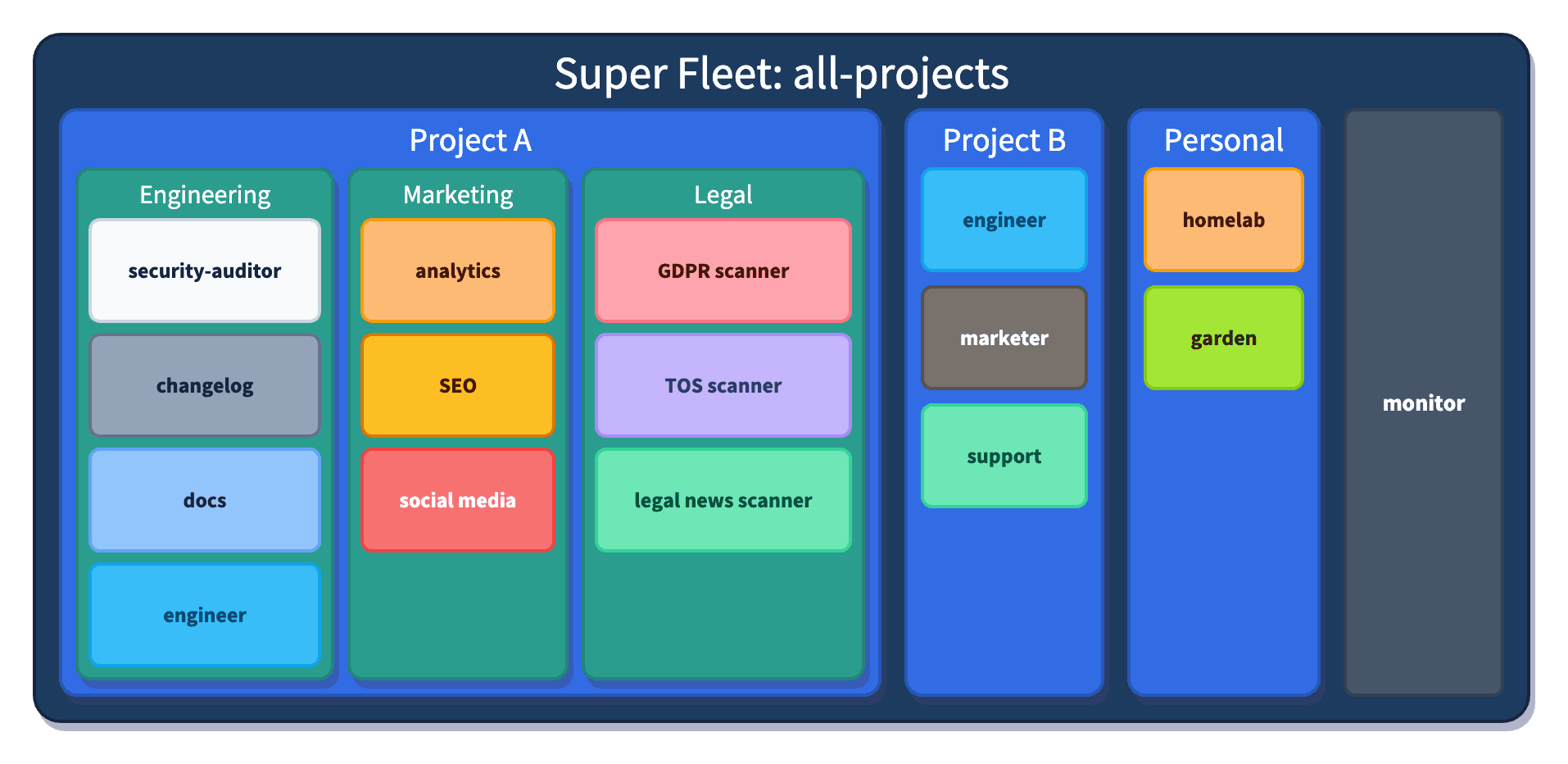
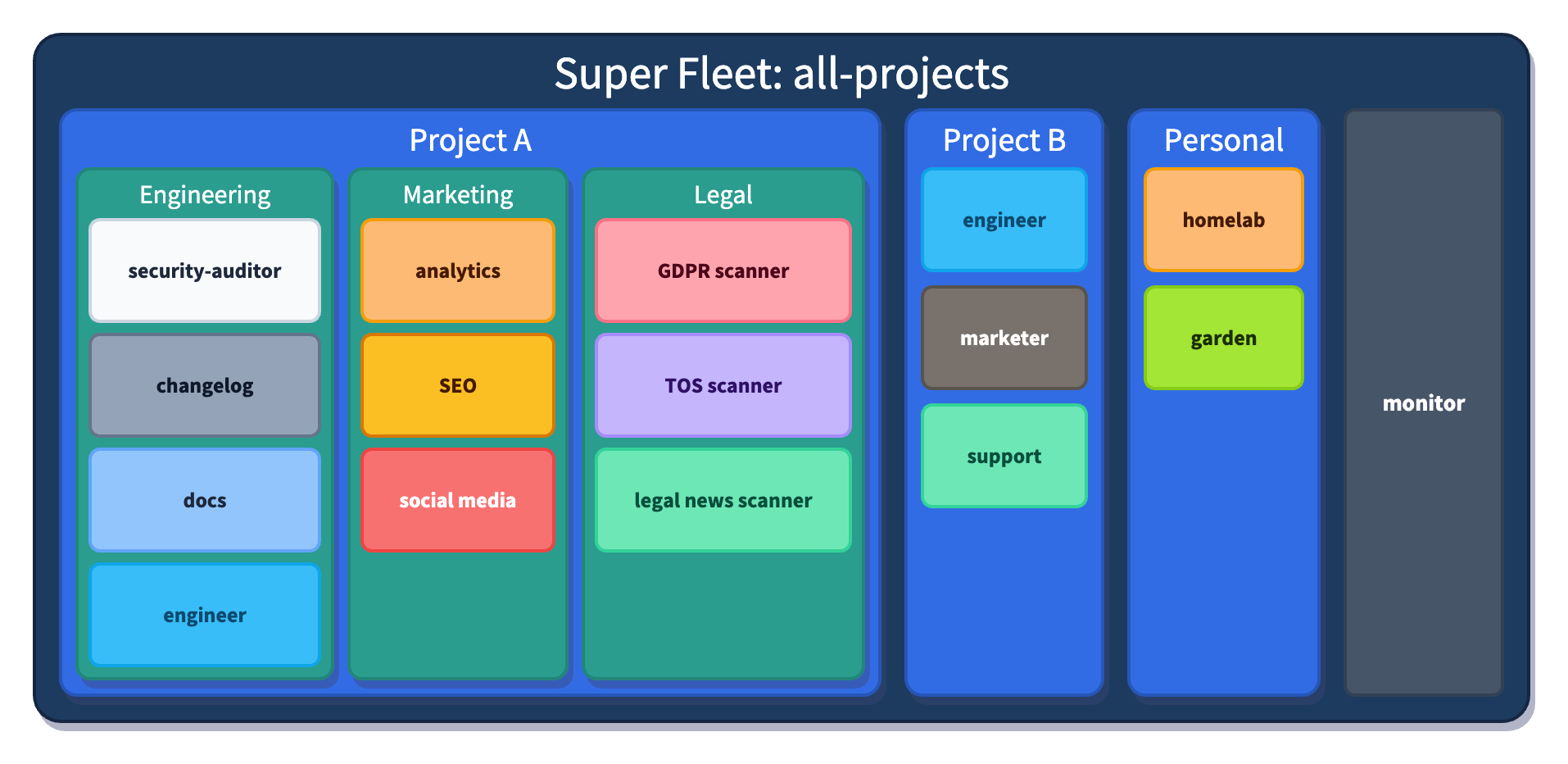
Fleets can contain sub-fleets, so you can organize agents by team, project, or department. A marketing team runs analytics and SEO agents. A legal team runs compliance scanners. A DevOps team runs security audits and infrastructure monitors. Each team owns their fleet — and they all compose into one.

Fleet composition hierarchy showing sub-fleets organized by team — marketing, legal, and DevOps each with their own specialized agents

The Big Picture

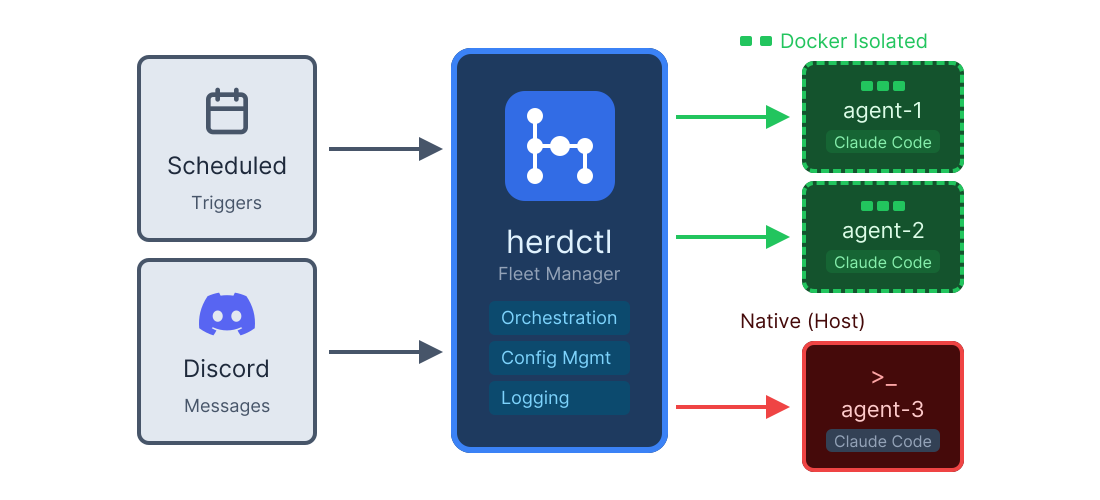
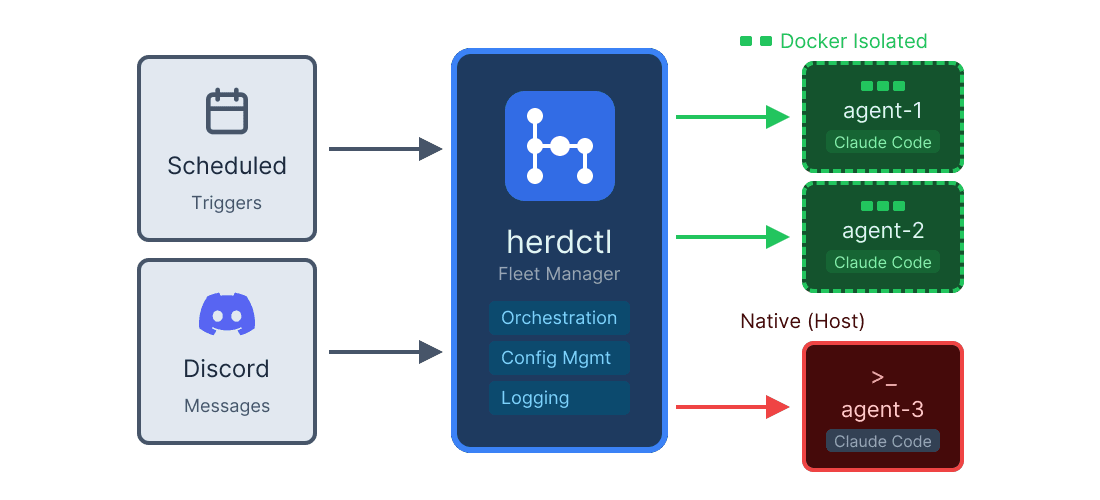
How herdctl works

herdctl architecture showing scheduled triggers and Discord messages flowing into the herdctl fleet manager, which spawns Docker-isolated and native agents

Simple Configuration

Your fleet in a few YAML files

One herdctl.yaml defines your fleet. Each agent gets its own directory with a herdctl-agent.yaml. Secrets live in .env.

Fleet Directory Structure
my-fleet/
├── herdctl.yaml# Fleet config
├── .env# API keys & secrets
├── agents/
├── pr-reviewer/
└── herdctl-agent.yaml
├── docs-writer/
└── herdctl-agent.yaml
└── monitor/
└── herdctl-agent.yaml
herdctl.yaml
version: 1

fleet:
  name: my-dev-fleet
  description: Development agents

defaults:
  model: sonnet
  max_turns: 50

agents:
  - path: ./agents/pr-reviewer
  - path: ./agents/docs-writer
  - path: ./agents/monitor
    overrides:
      docker:
        enabled: true

Security First

Run agents in Docker containers

AI agents are inherently risky - they can be manipulated or confused into doing things they shouldn't. Docker isolation is the gold standard for containing that risk, and herdctl makes it dead simple.

  • File system isolation - agents can't access your real files
  • Network controls - whitelist ports, IPs, and hosts
  • Resource limits - prevent runaway processes and fork bombs
  • Process isolation - agents can't see your system processes
herdctl-agent.yaml
name: my-agent

# Enable Docker isolation - that's it!
docker:
  enabled: true

# Lock down what tools the agent can use
allowed_tools:
  - Read
  - Glob
  - Grep
  - Edit
  - Write

See it in action

20-minute overview

Watch a complete walkthrough of herdctl's core features: fleet management, scheduled agents, chat integration, and session continuity.

Monitor Everything

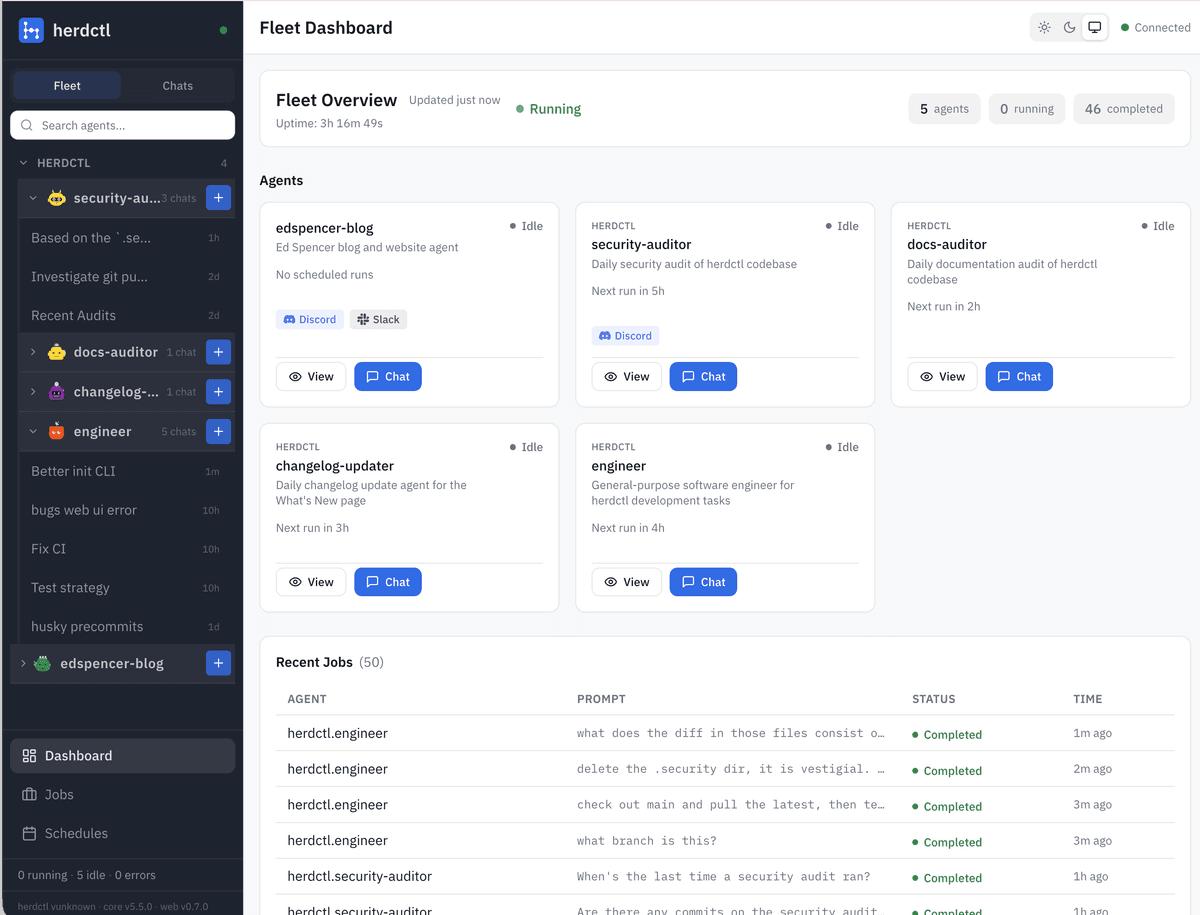
Built-in Web Dashboard

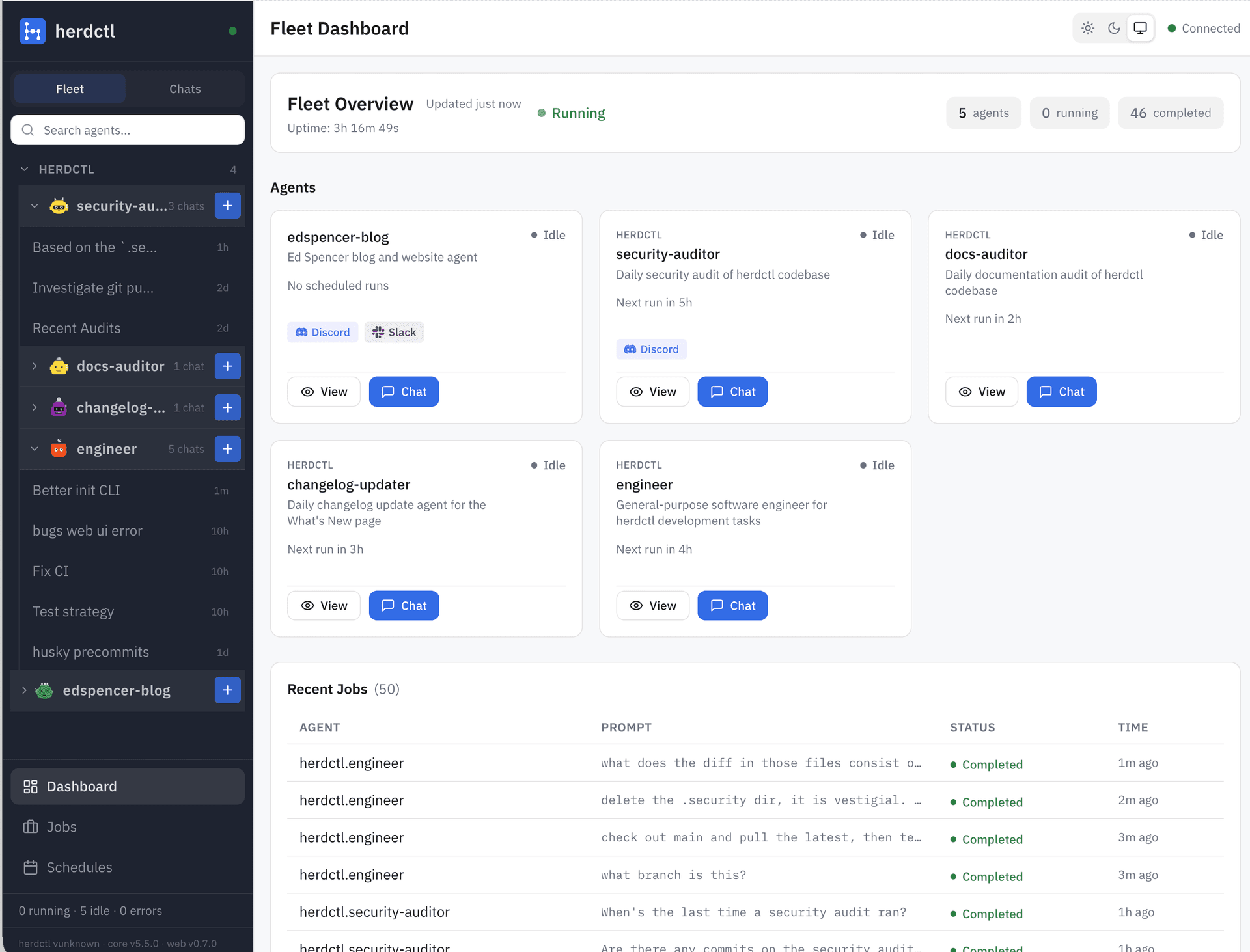
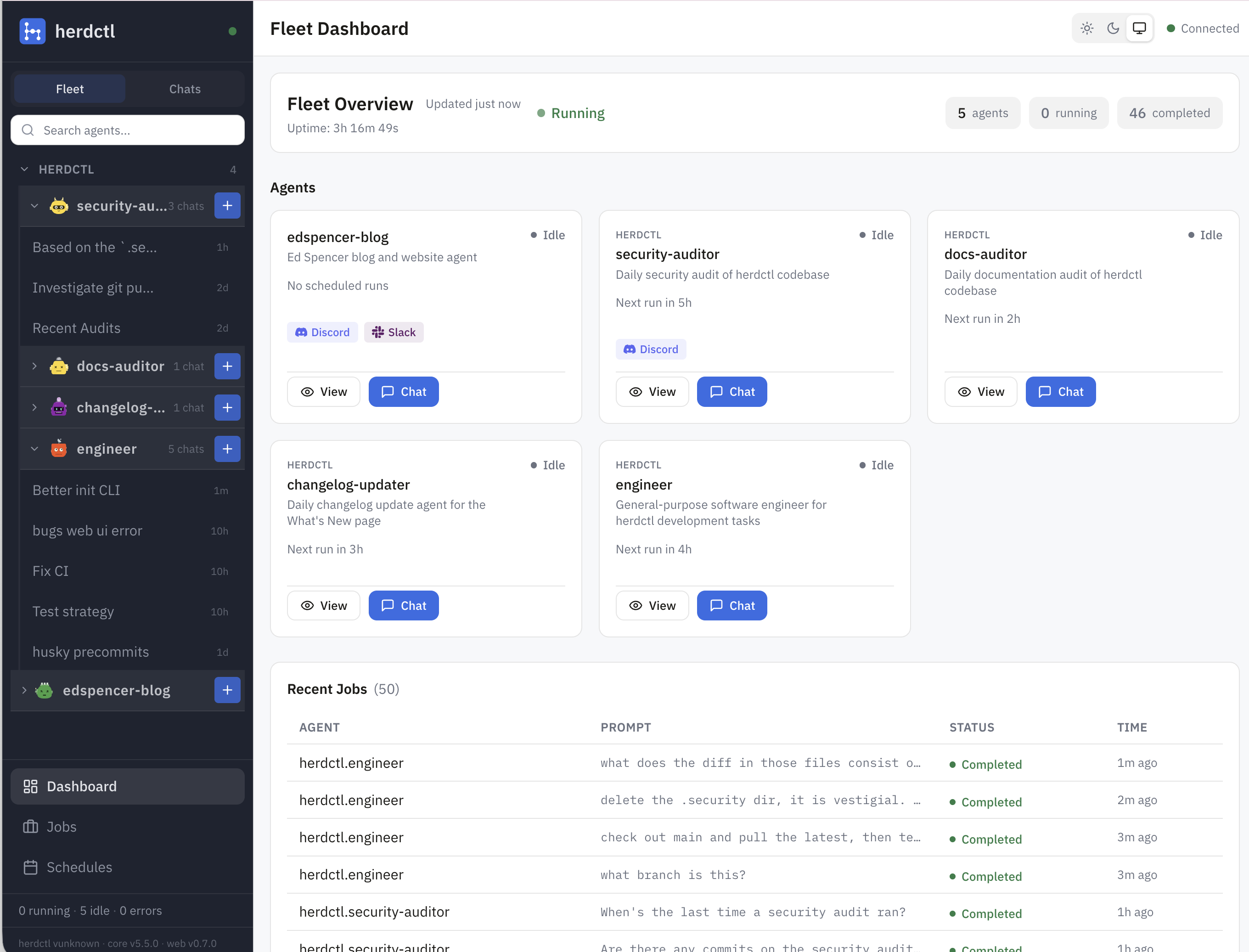
See your entire fleet at a glance. Real-time status updates, live output streaming, and interactive chat - all from your browser. No external services required.

  • Live agent output - WebSocket-powered streaming as agents work
  • Interactive chat - Message agents directly from the dashboard
  • Schedule management - Trigger, enable, and disable schedules
  • Job history - Filter, paginate, and inspect past runs
herdctl web dashboard showing fleet overview with agent status and recent jobs

Key Features

Schedules for Claude Code

Define agents that wake themselves up on schedules or triggers. Cron expressions, intervals, or one-off jobs - all from YAML config.

herdctl-agent.yaml
schedules:
  daily_review:
    type: cron
    expression: "0 9 * * *"
    prompt: |
      Review all open PRs...
Thin Claude Code Wrapper

If Claude Code can do it, your herdctl agent can do it. Same tools, same MCP servers. Lock down permissions per-agent.

herdctl-agent.yaml
allowed_tools:
  - Read
  - Edit
  - WebSearch
  - Bash(git)
  - Bash(ssh)
Connect to Chat

Connect agents to Discord or Slack. Message your agents from your phone and they continue working.

herdctl-agent.yaml
chat:
  slack:
    bot_token_env: SLACK_BOT_TOKEN
    app_token_env: SLACK_APP_TOKEN
    channels:
      - "#dev-agents"
Session Continuity

Every job creates a real Claude SDK session. Resume that exact session in your terminal with claude --resume. Full context preserved.

terminal
# List recent sessions
herdctl sessions

# Resume in your terminal
claude --resume session-id
Two Runtimes

CLI runtime uses your Claude Max subscription (much cheaper). SDK runtime uses API pricing*. Choose per-agent.

herdctl-agent.yaml
# Use Claude Max tokens
runtime: cli

# Or use Anthropic API
runtime: sdk
Hooks & Automation

Trigger actions on job completion. Post to Discord, run shell scripts, call webhooks - all configurable per-agent.

herdctl-agent.yaml
hooks:
  after_run:
    - type: discord
      channel_id: "${CHANNEL}"
      when: 'job.scheduleName'

Proactive Alerts

Agents come to you

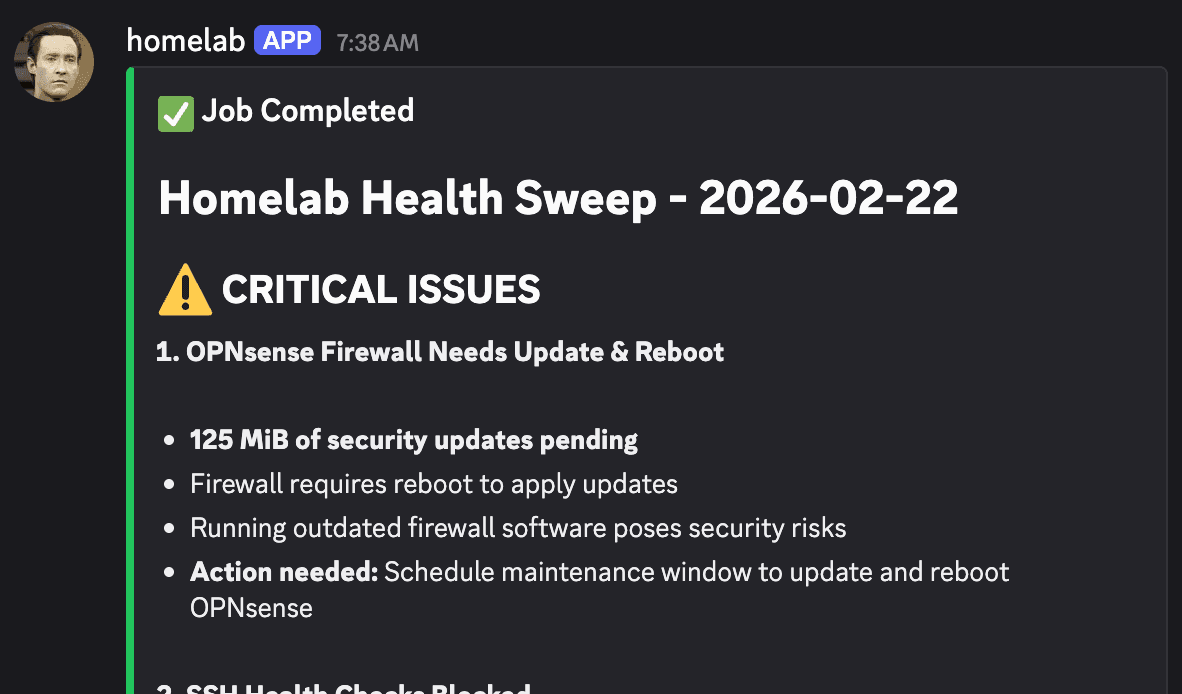
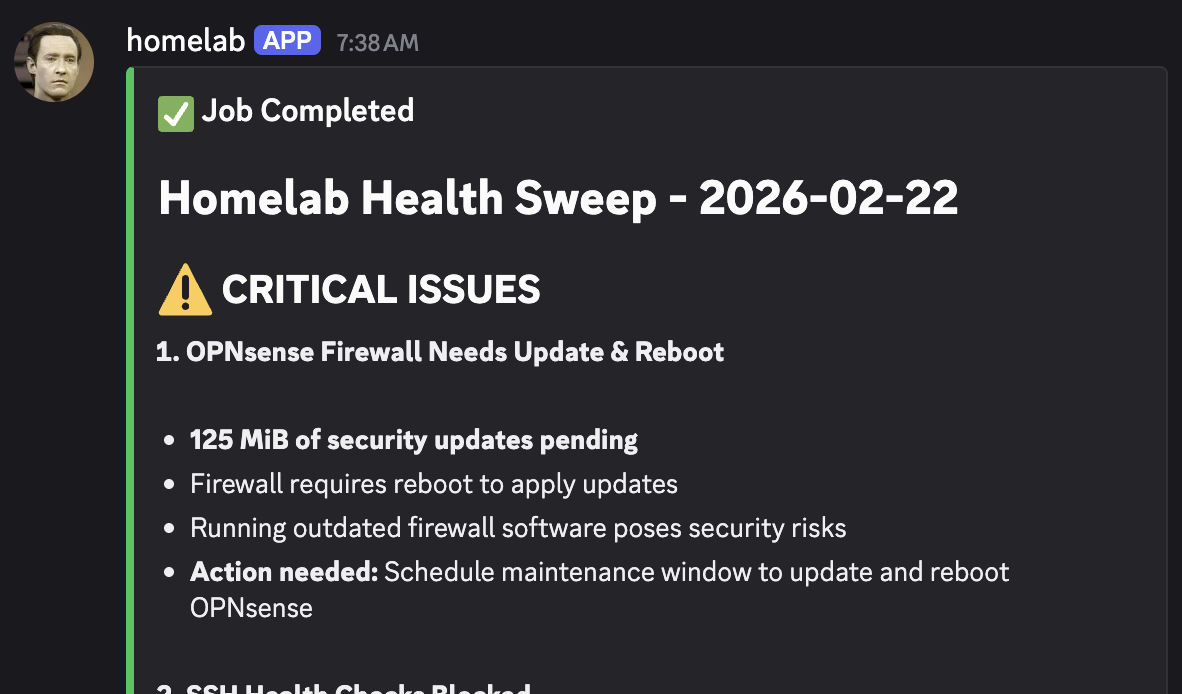
Agents don't just wait to be checked on. Configure hooks to post results to Discord or Slack after every run. Get security findings, build failures, or daily summaries delivered straight to your team's channels.

Discord notification from a herdctl agent reporting daily security audit findings including critical firewall issues

A homelab agent reports security findings to Discord every morning

Use Cases

What can you build with herdctl?

Any task that's repetitive, time-sensitive, or benefits from continuous monitoring is a candidate for automation.

Every team gets their own fleet

Marketing

  • Analytics dashboards
  • SEO monitoring
  • Sentiment analysis
  • Competitor tracking

Legal & Compliance

  • GDPR scanner
  • Terms of Service monitor
  • License auditor
  • Legal news alerts

DevOps

  • Security audits
  • Infrastructure monitoring
  • Dependency updates
  • Incident response

Example agents

PR Review Bot

Review all open PRs every morning at 9am. Leave thoughtful comments, suggest improvements, flag security issues. Trigger via Slack or Discord: 'Hey, can you review PR #47?'

Software Developer Agent

Point an agent at your codebase - it honors your CLAUDE.md, uses your slash commands, connects to your MCP servers. Chat with it on Slack or Discord from your phone.

Documentation Agent

Scan your codebase weekly for undocumented functions. Generate JSDoc comments, update README files, create examples. Review its own output before committing.

Continuous Security Audit

Daily scans for vulnerabilities, misconfigurations, and exposed secrets. Findings get reported to Discord. Run it long enough and it catches things humans miss.

Competitive Analysis

Daily scans of competitor websites, pricing pages, and feature announcements. Get notified when something changes. Weekly summary reports to your team.

Community Intelligence

Monitor Reddit, Hacker News, Twitter for mentions of your product. Surface questions, complaints, and feature requests. Draft responses automatically.

From the Blog

Building herdctl in public

Follow along as I build and evolve herdctl. Technical deep-dives, design decisions, and lessons learned.

herdctl: Composable Fleets of Claude Agents

herdctl: Composable Fleets of Claude Agents

I justed added support for Composable Fleets to herdctl. As I build herdctl into more projects, I increasingly find myself creating a fleet of agents per project, and wanted a way to run them all from a central place so that I can juggle a bunch of things at once.
Continuous Security Auditing with herdctl

Continuous Security Auditing with herdctl

herdctl makes it really easy to run agentic workflows on a schedule. One of the first such workflows I added to herdctl itself was a daily security audit. This has been running for a few weeks now, so I wanted to share some early results.

Run Claude Code Agents in Docker with herdctl

Run Claude Code Agents in Docker with herdctl

herdctl now supports running Claude Code Agents in Docker containers, significantly expanding your options for locking your agents down. It also added support for the claude code CLI runtime, ensuring your can use your inexpensive Claude Max Plan tokens.

View all posts →

Ready to build your agent fleet?

Get started in under 5 minutes. Open source, free forever.

* The Claude Agents SDK does not officially support using your Claude Max account, but as of the time of writing it was nevertheless possible to set a CLAUDE_CODE_OAUTH_TOKEN environment variable and have the Agents SDK use your Max account. Long may it last.