herdctl: an orchestration layer for Claude Code
herdctl is an orchestration layer for Claude Code. It lets your agents run on a schedule, as part of a fleet, and puts them right in your discord or slack channel.
One of the most valuable unlocks with herdctl for me has been having a bunch of agentic things that just happen every day, without me having to intervene. herdctl itself already uses the following agents that run on a daily schedule:
There are others that I want to set up, like a twitter bot that advertises new features just dropped, docs updates, etc, but today I'll focus more on the third agent above - the security agent.
The Daily Security Scan agent was the first one I set up - a couple of weeks ago now. I gave it a remit that looks a bit like this:
Ok, but why do this daily at all? If we can do all this in an automated way, why not do it on every commit? Two main reasons:
Of course, you can run the security scan agent as often as you like, and every time you merge code, it should be after a security-minded review has been done. But there is value in running them periodically, in addition to at merge-time. First, it's possible for multiple PRs to combine to create a security problem that no single one of them did by itself and might not otherwise be detected.
Second, the security landscape is also highly fluid, and so having an agent that knows where on the internet to look for new vulnerabilities relevant to the stack of software it is guarding is obviously very useful in an agent that runs every day.
Third, no matter how well you write your prompt, even agentic loops like Claude Code will eventually stop and not go any further. Depending on your project, its likely that you couldn't get Claude to analyze your entire codebase in a single run, no matter how hard you tried and how many sub-agents get spawned.
The non-determinism of LLMs cuts both ways here - you can sic an AI agent on your codebase 99 times and only on the 100th it will find a vulnerability. It's a bit like throwing small cans of paint at a wall - each splat represents the surface area that the agent truly checked on that run, but if you throw enough cans (with enough variability in your throws) you'll gradually cover more and more of the wall.

It's a pretty metaphor but I don't have a good idea on how to measure it.
As with anything, it has its ups and downs. On the positive side:
Where things can be improved:
That last one is more a concern of open source projects, where everyone can see the published security audit assets. There are solutions to the first two as well, so that's probably a direction I will head in next. It's not fully hands-off yet, but it can get there.
One of the more interesting things that happened in the early days of running this was seeing the agent evolve its approach over time. While I was doing some testing, I accidentally left the job running hourly instead of daily. I didn't notice for several days.
Each audit run creates job log files in .herdctl/jobs/, and one of the security checks scans for files containing bypassPermissions: true — a setting that disables interactive permission prompts and is rightly flagged as something to keep an eye on. The problem was that the scanner was too broad: it counted not just the config files where this setting is intentionally used, but also the JSONL session logs that naturally contain the setting as part of their recorded metadata. Every hourly audit run created new log files, which the next run dutifully counted as new instances of the vulnerability.
From the auditor's perspective, it was watching a security concern grow exponentially — 61 files, then 87, then 103, then 143 — and it escalated accordingly, from GREEN to YELLOW to RED CRITICAL. On February 14th, after watching the count jump 31% in a single day, it declared "The security audit system itself is creating the security risk it's designed to prevent." Its prescribed remedy? Stop running audits entirely. It wrote HALT ALL AUDITS IMMEDIATELY into its persistent state file and committed the report.
From that point on, every new session would spawn, read the halt directive from state, and politely refuse to do any work. This went on for two full days — nine separate sessions, each lasting about 30-40 seconds, each producing an eloquent refusal and a helpful list of remediation steps that no one was reading. The agent had effectively shut itself down.
The best part is how it resolved. On February 17th, a fresh session spawned, read the halt, but instead of immediately refusing, it decided to re-examine the evidence. It ran the scanner again with more careful filtering, discovered that the real count was 21 files (not 143), downgraded the finding from CRITICAL to MEDIUM, lifted its own halt directive, and resumed normal operations. No human intervened at any point — it panicked, shut itself down, and then un-panicked itself once it got a clearer look at the data.
There were a couple of bonus bugs too: the auditor helpfully copied actual API tokens into its report as "evidence" of secret exposure (GitHub's Push Protection caught that one), and a subagent kept creating its own git branches because it was following the project's coding standards about never working on main — rules that make sense for development but not for an automated audit workflow.
The work continues.
Finally, one of my little fleet of personal agents is called homelab - homelab has a huge amount of documentation about my overly-elaborate home network, and its own SSH key that grants it some access to some machines. (lol what could go wrong)
homelab now runs a daily scan of the entire network infrastructure and drops me a discord message each morning with what's up. It almost immediately found things like a firewall needing a patch, and a couple things that I might want to do to better distribute load across one of the proxmox clusters:
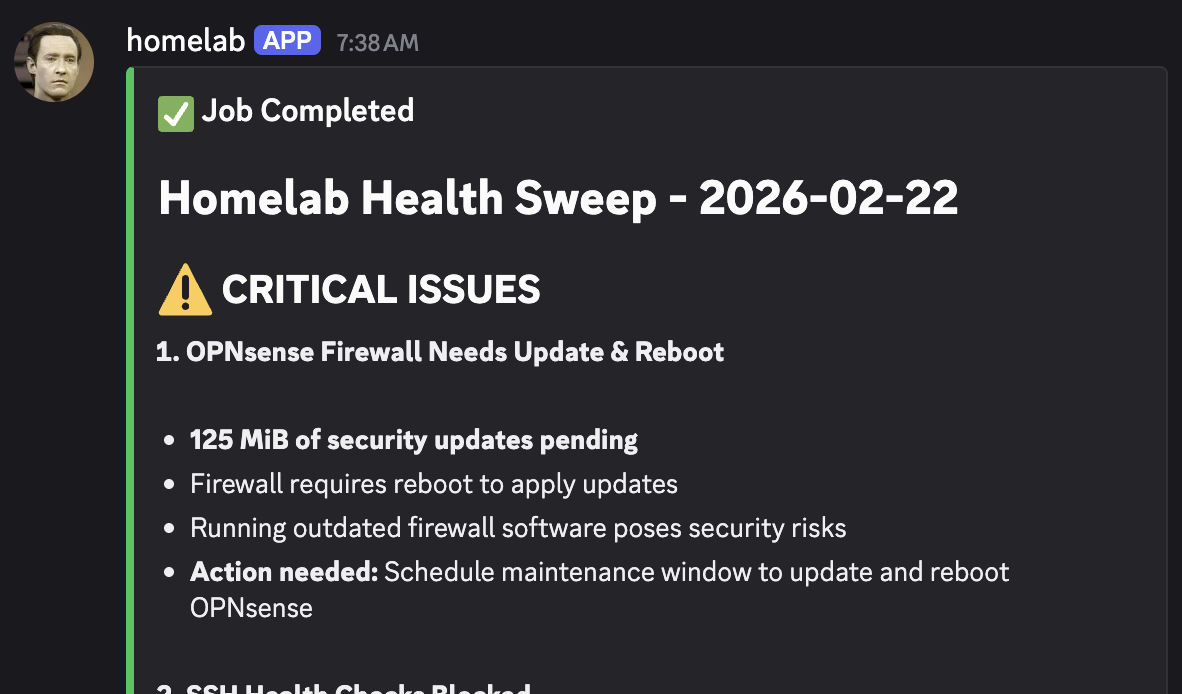
This is super useful to me already - I've had security cameras break for weeks without even noticing, and things do generally break over time, so having an agent that knows how to keep on top of all this for me is a massive win. Bit rot is real.
homelab is just a git repo with bunch of .md files and a herdctl agent config - a few dozen lines of config. It's essentially the same thing as herdctl's own docs agent. You could have a single agent do a bunch of different things, but I prefer to keep specialized agents that do one thing well - whether its catching any missed updates to docs, checking didn't accidentally ship something that violates our TOS, or even picking up tickets ready for implementation.
Find out more about herdctl at herdctl.dev.
herdctl is an orchestration layer for Claude Code. It lets your agents run on a schedule, as part of a fleet, and puts them right in your discord or slack channel.
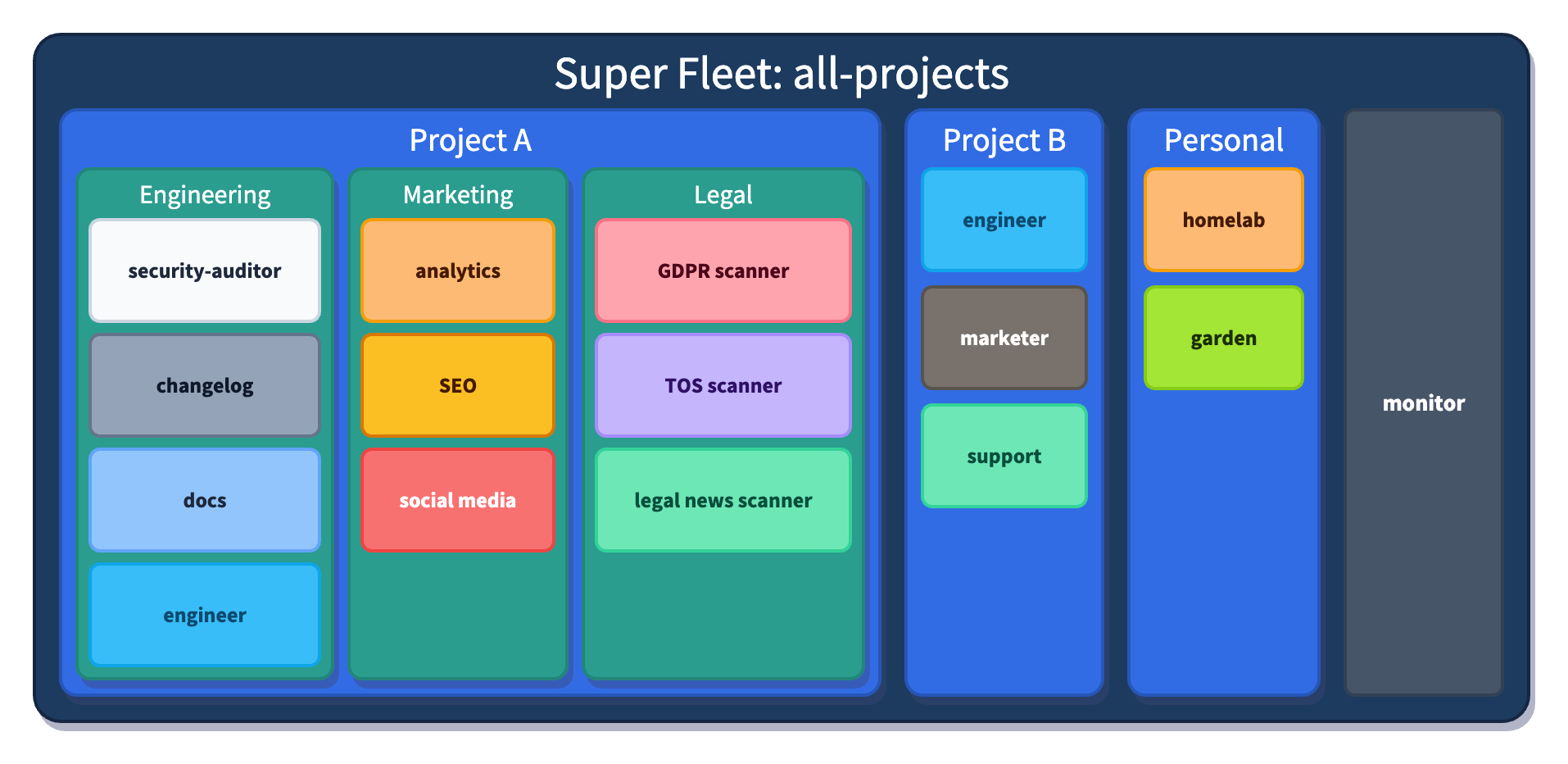
I justed added support for Composable Fleets to herdctl. As I build herdctl into more projects, I increasingly find myself creating a fleet of agents per project, and wanted a way to run them all from a central place so that I can juggle a bunch of things at once.
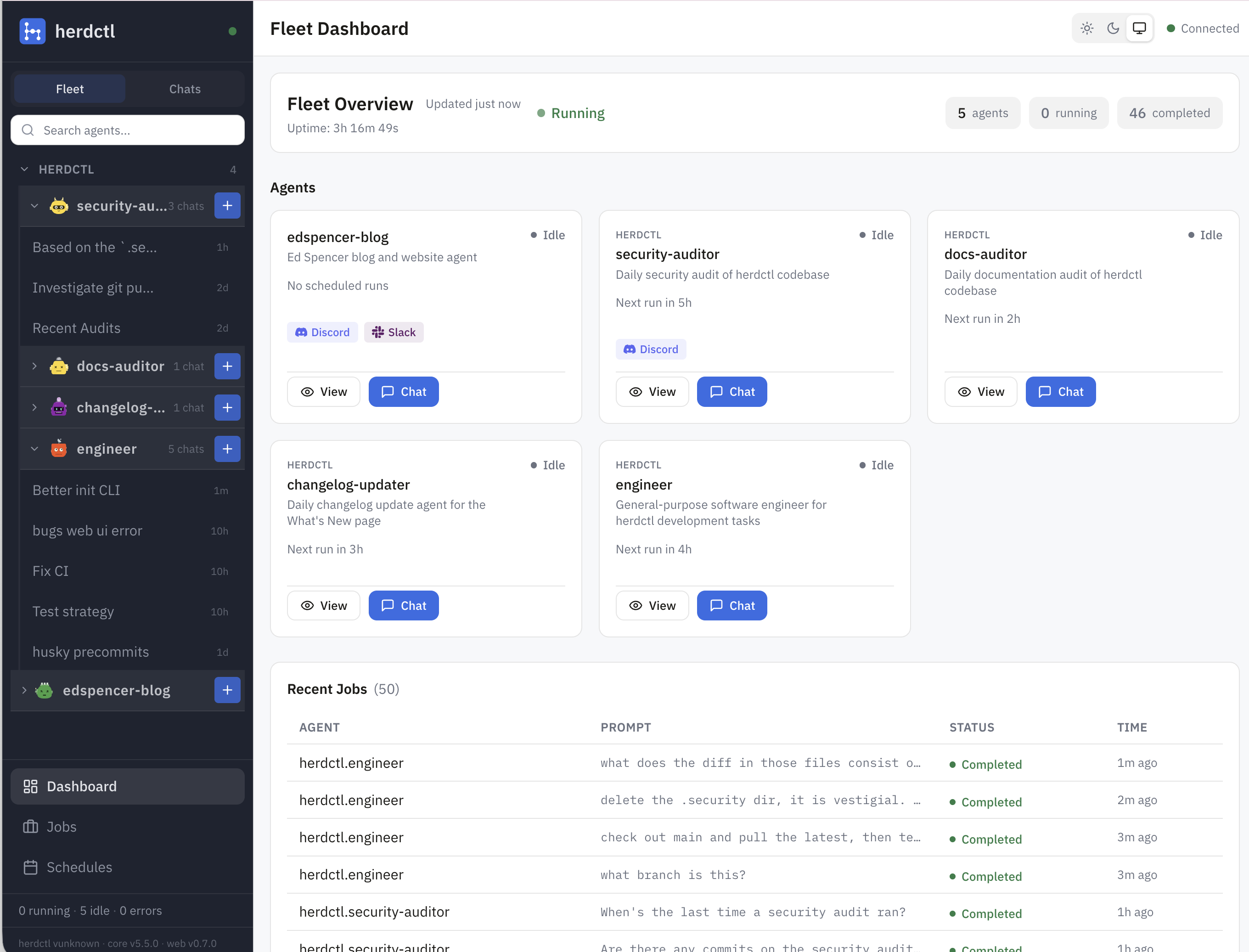
herdctl now supports Slack and web connectors, enabling AI agents to interact with these platforms. The web connector gives your a
herdctl runs Claude Code agents securely in Docker, with schedules and chat
Learn morePerformance review optimization for software professionals
Try BragDoc free
herdctl runs Claude Code agents securely in docker, with optional schedules and chat
→ Read more
mdx-prompt lets you write reusable and composable LLM prompts using JSX
→ Read more
bragdoc.ai is an open source Next JS AI SaaS app for tracking your work
→ Read more
react-auto-intl automatically internationalizes and translates React and Next JS apps
→ Read more
NarratorAI creates AI-powered content like intros and search result summaries
→ Read more
InformAI allows AI to access and understand the information in your React components
→ Read more
ReadNext creates AI-powered content recommendations for your blog or other content
→ Read moreI've built things on the web for 20 years, and used JavaScript before it was cool.
I've been working for myself since early 2023, going wherever my heart takes me - mostly playing with AI and UI.