Better Claude Code with Paddock on Your Laptop
Paddock is a better interface for Claude Code. I created it because I love Claude so much that I keep dozens of them going, whether they're writing code or helping me plan my hot water tank install, or managing my homelab for me. But the CLI isn't really set up for managing a bunch of weeks-long Claude Code sessions, and UX-wise it's got some obvious challenges.
Paddock organizes your Claude Code sessions, lets you resume them from anywhere, and provides a much better interface for managing them. It can work alongside your existing Claude Code setup - you don't have to choose between the two. And it now works out of the box on your laptop with a single npx command. Try it out like this:
Paddock works with your MCP servers, your plugins, your existing chats, and your Claude Max account:
Claude Code, meet Paddock
I don't know about you, but I have dozens of Claude Code sessions going at any one time. There will generally be a handful of them that I'm actively paying attention to, and then a long tail of chats that I want to keep around but might not need to look at for a while. But it's really hard to manage 50+ terminal tabs, and it's painful to restore all that state after a laptop restart.
And beyond that, I'm sick of being chained to my laptop. It's not natural. I want to be able to keep hundreds of Claude Code sessions going across any number of projects, and access them from anywhere, in a modern UI that doesn't hurt my middle-aged eyes. I need a Paddock to put my herd of Claudes in.
Paddock is a thin wrapper around Claude Code. As well as solving Claude Code terminal tab hell, it brings some powerful features that Claude Code really ought to have:
- Persistent sessions that survive restarts
- 1-click forking of sessions
- Chat sessions that can spawn child chat sessions, even between projects
- 2-way file sending with beautiful rendering of images, code, markdown and other types of content
- Triggers and schedules with per-session Claude Code configurations
It works with your Claude Max plan (and dear god will it drain that thing dry), and it frees Claude Code from the confines of a single machine. The best way to run it - the way I run it - is on a dedicated small server in your house. You can totally run it on your laptop if you want, but having Claude Code running on a 24/7 box that you can access from any laptop or phone is a game changer.
Tell me more
herdctl: Composable Fleets of Claude Agents
I justed added support for Composable Fleets to herdctl. As I build herdctl into more projects, I increasingly find myself creating a fleet of agents per project, and wanted a way to run them all and see what's going on with them.
Fleet Composability means you can create hierarchical fleets of related agents, like this:
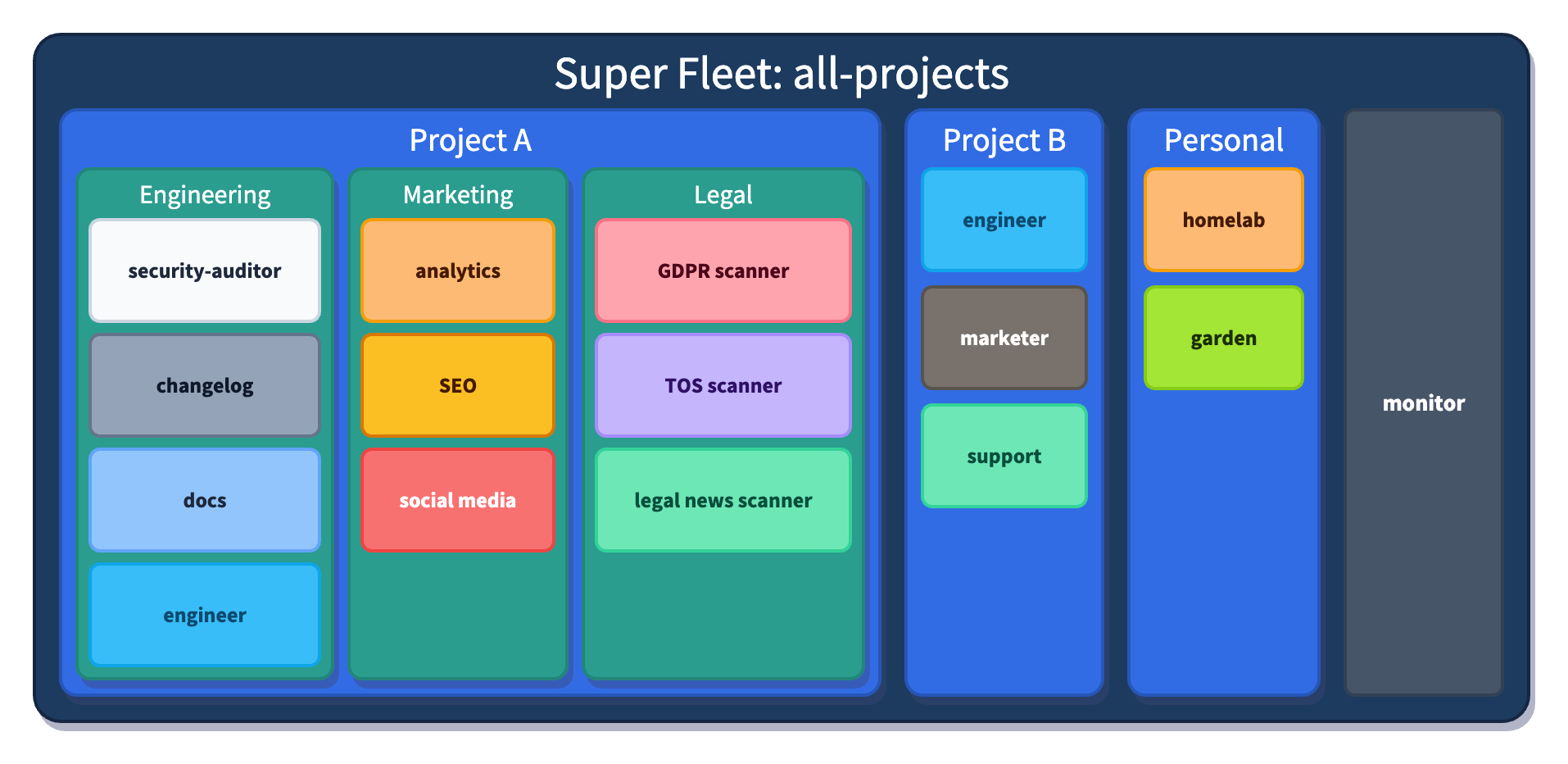
Fleet Composability means you can create a hierarchy of teams of agents, each with its own defined responsibilities and scratch directory that it can use to store state and artifacts. herdctl already has 4 of those agents so far, so I keep them a single fleet, but as herdctl itself is only one of the projects that I'm working on, I actually run a superfleet of all of them.
The web UI knows about fleet composability and renders my fleets like this:
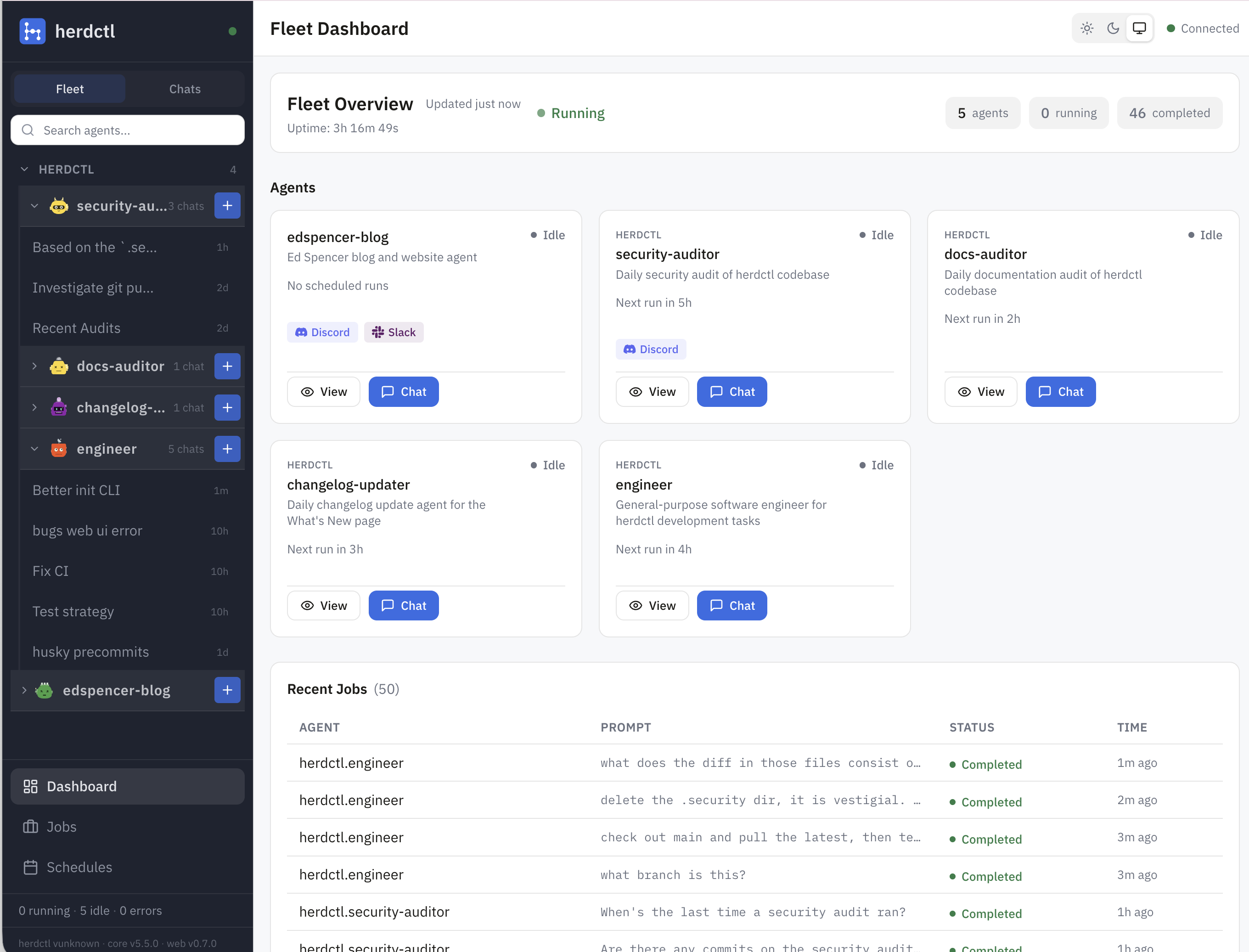
For the herdctl project itself, I'm currently running 4 agents, in a single fleet for now:
- security - daily schedule scans the repo every day for new security issues
- docs - daily schedule, scans to see if any commits should have had docs updates but didn't, makes PRs if so
- changelog - scans each day to see if we did anything worthy of putting on the docs changelog page
- engineer - general purpose engineering agent that I can chat with
The first 3 of those are all "background" agents that run on a schedule and just continually fix things that can otherwise drift over time unless a human pays attention to them. I suspect I'll end up with a bunch more agents following the same pattern. Each agent gets its own agents/myAgent directory with its own configuration and prompts. It's Claude Code so it can do whatever you want it to really.
Continuous Security Auditing with herdctl
One of the most valuable unlocks with herdctl for me has been having a bunch of agentic things that just happen every day, without me having to intervene. herdctl itself already uses the following agents that run on a daily schedule:
- changelog - updates the docs changelog page if anything worthy happened that didn't make it there already
- docs - scans to see if any commits should have had docs updates but didn't, makes PRs if so
- security - daily schedule scans the repo every day for new security issues
There are others that I want to set up, like a twitter bot that advertises new features just dropped, docs updates, etc, but today I'll focus more on the third agent above - the security agent.
Daily Security Scans
The Daily Security Scan agent was the first one I set up - a couple of weeks ago now. I gave it a remit that looks a bit like this:
- Develop and maintain a model of the codebase
- Track which areas of the code are most vulnerable
- Track ongoing potential security vulnerabilities
- Run a daily scan to re-check everything
- Alert me if anything looks suspicious
Ok, but why do this daily at all? If we can do all this in an automated way, why not do it on every commit? Two main reasons:
- cost - the last run went for 37 minutes, which is a lot of tokens
- lead time - the last run went for 37 minutes... CI currently takes about 1 minute
Of course, you can run the security scan agent as often as you like, and every time you merge code, it should be after a security-minded review has been done. But there is value in running them periodically, in addition to at merge-time. First, it's possible for multiple PRs to combine to create a security problem that no single one of them did by itself and might not otherwise be detected.
Herdctl Gains Slack and Web Connectors
This week herdctl gained support for Slack and Web connectors, opening up two new ways to interact with your Claude Code agents, running on whatever machine you like.
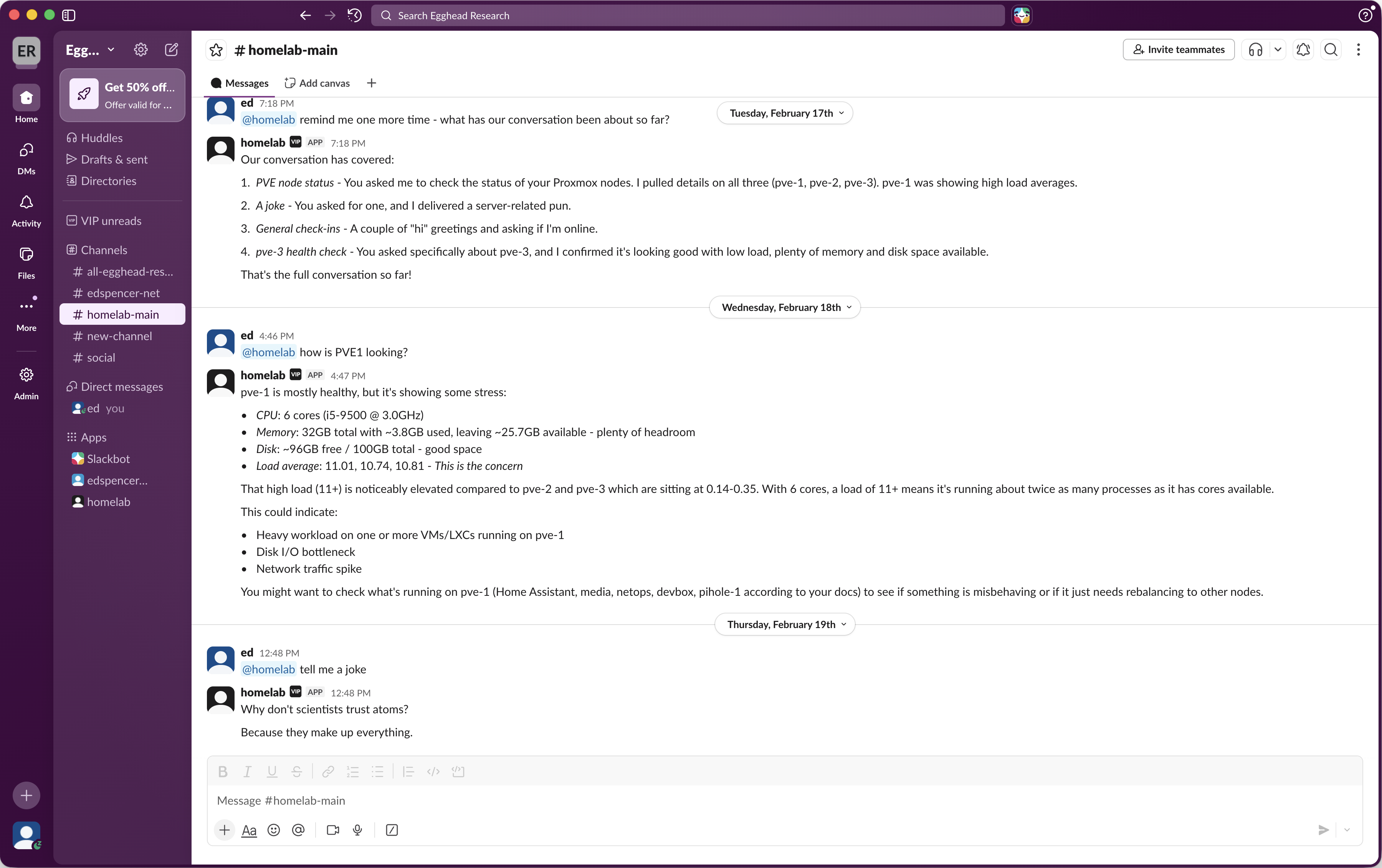
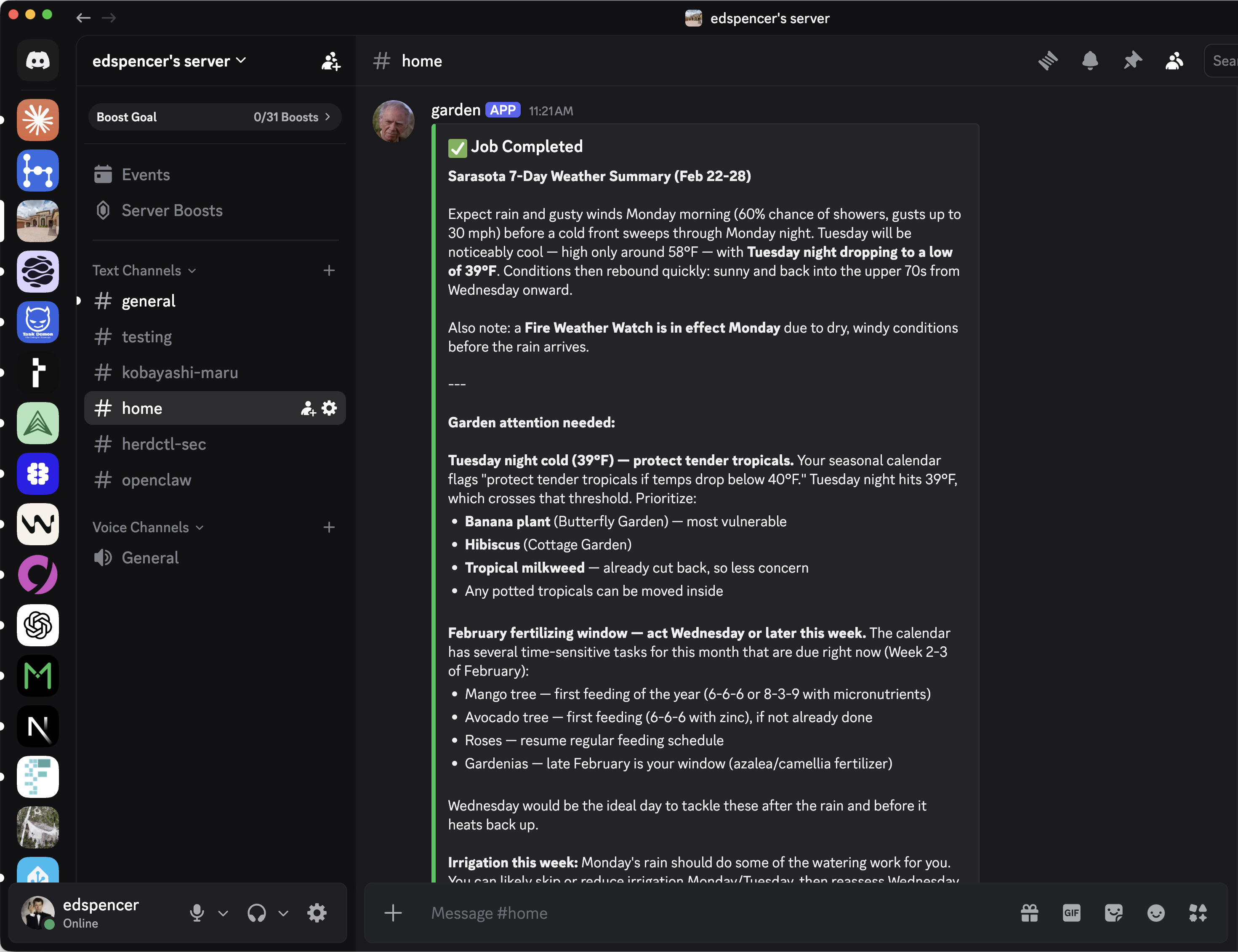
The new web UI provides fleet management and a chat frontend. It's a bring-your-own-auth app that you can configure to run on your laptop, on a proxmox machine (I do both), in the cloud, or wherever. Enable it like this in your fleet config:
Then just start your fleet like normal:
Here's what it looks like:
Run Claude Code Agents in Docker with herdctl
herdctl can now run Claude Code Agents in Docker containers, significantly expanding your options for running powerful local agents that do not have full access to your system - whether you're running agents on your laptop, in the cloud or both.
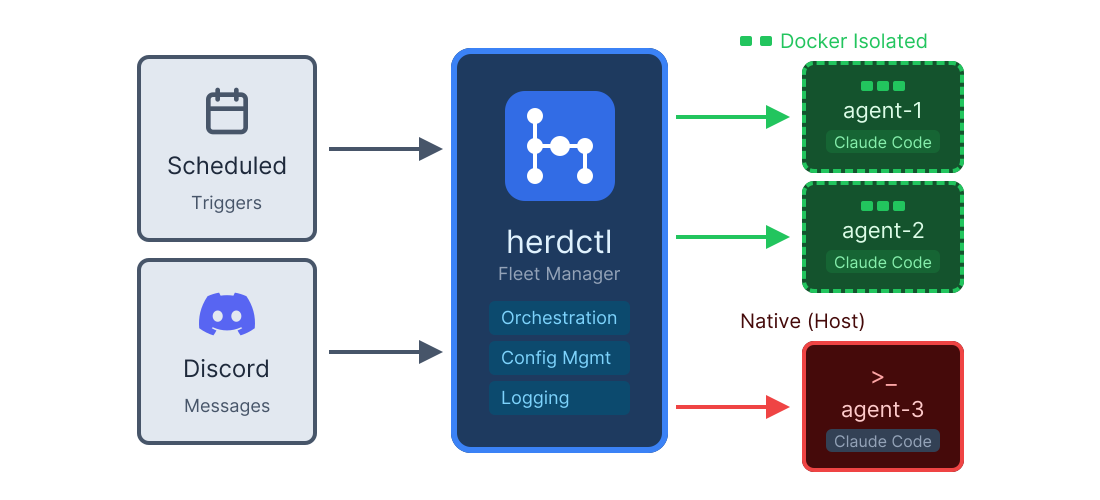
Enabling docker mode is really easy:
A full agent definition now looks something like this:
The above is a snippet of an actual "Subject Matter Expert" agent that I run - in this case it helps me with gardening. This agent is actually open-source - it's highly specific to my specific situation, but it should illustrate how this simple pattern works. We'll come back to that repo in a moment.
herdctl: an orchestration layer for Claude Code
I love Claude Code, but there are three things I really wish it could do:
- Invoke itself, on a schedule or in response to events
- Let me talk to it over discord or slack
- Let me coordinate dozens of Claude Code agents together
This is what herdctl aims to do. herdctl is an MIT-licensed orchestration layer for Claude Code. More accurately, it's an orchestration layer for the Claude Agents SDK, upon which herdctl is built. It's been built in about a week using a combination of Claude Code, ralph wiggum, and GSD. It is not production ready.
Here's a video showing it in action:
You can join the discord server to chat with those Star Trek agents. They're running in a container on an old machine in my homelab so although there's not a whole lot to be gained by trying to talk them into doing bad things, I am expecting people will try. Either I'll have a Lieutenant Worf up in time to guardrail those, or I'll just kill the agents, so YMMV.
Install it with npm install -g herdctl or check out the github repo and docs site for more.
What?
herdctl uses .yml files to define fleets of agents that can be invoked either on by schedule or by trigger. This is a thin wrapper around the Claude Agents SDK configurations, plus a couple of herdctl-specific ones like schedules and hooks.
claudify: fire and forget for Claude Code
Sometimes I find myself doing the same thing over and over again. One of those things looked like this:
- Find that my test suite is failing
- Open up Claude Code
- "Please run
pnpm testand fix the failures" - Wait
Maybe there's only one failing test out of the ~1000 tests in the suite, so we can kinda optimize it a little:
- Look to see which test file was causing the problem
pnpm test /path/to/that/file.test.ts- Open up Claude Code
- Copy/paste the
pnpm test ...command and its output and hit enter - Wait
That's faster as it lets Claude Code focus on a single test file. But it still involved me doing the work of copying and pasting the command and its output. It's a First World Problem of truly quotidian proportions.
What if I could do this instead, and have it be equivalent to all the hard work described above?: