Run Claude Code Agents in Docker with herdctl

herdctl can now run Claude Code Agents in Docker containers, significantly expanding your options for running powerful local agents that do not have full access to your system - whether you're running agents on your laptop, in the cloud or both.
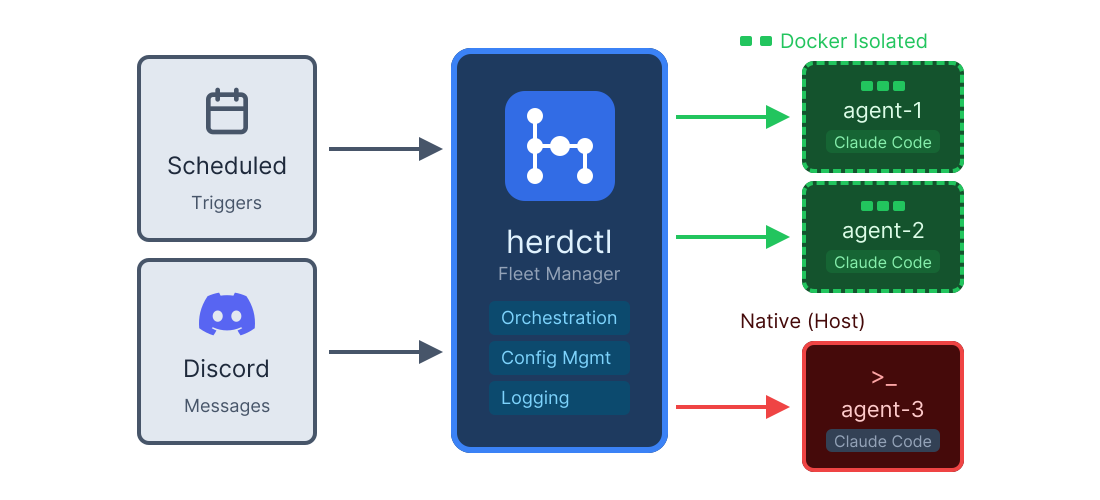
herdctl architecture showing scheduled triggers and Discord messages flowing into the herdctl fleet manager, which spawns Docker-isolated and native agents

Enabling docker mode is really easy:

herdctl-agent.yaml
name: my cool agent

# this is all you need to add
docker:
enabled: true
herdctl-agent.yaml
name: my cool agent

# this is all you need to add
docker:
enabled: true

A full agent definition now looks something like this:

herdctl-agent.yaml
name: Gardener

docker:
enabled: true

# locked-down permissions for our agent - see https://herdctl.dev/configuration/permissions/ for more information
allowed_tools:
- Read
- Glob
- Grep
- Edit
- Write
- ... etc

# we can attach any number of agentic jobs to run on any number of schedules
schedules:
weather:
type: interval
interval: 72h # every 72 hours
prompt: |
Give me a weather report for the next 7 days and give me a summary.
For example, "Sunny in the 80s until Wednesday, then expect rain most afternoons until Saturday."
Look at your .md files in this project and see if any of my garden needs attention based on the weather.
If it does, be sure to mention it in your final message.

# optionally add our agent to discord/slack
chat:
discord:
# discord chat config here
herdctl-agent.yaml
name: Gardener

docker:
enabled: true

# locked-down permissions for our agent - see https://herdctl.dev/configuration/permissions/ for more information
allowed_tools:
- Read
- Glob
- Grep
- Edit
- Write
- ... etc

# we can attach any number of agentic jobs to run on any number of schedules
schedules:
weather:
type: interval
interval: 72h # every 72 hours
prompt: |
Give me a weather report for the next 7 days and give me a summary.
For example, "Sunny in the 80s until Wednesday, then expect rain most afternoons until Saturday."
Look at your .md files in this project and see if any of my garden needs attention based on the weather.
If it does, be sure to mention it in your final message.

# optionally add our agent to discord/slack
chat:
discord:
# discord chat config here

The above is a snippet of an actual "Subject Matter Expert" agent that I run - in this case it helps me with gardening. This agent is actually open-source - it's highly specific to my specific situation, but it should illustrate how this simple pattern works. We'll come back to that repo in a moment.

Security benefits of running in Docker

Running an agent inside a Docker container provides us with a number of security benefits. Claude Code already ships with a bunch of isolation features, but docker is the gold standard here, and offers a lot more:

  • Completely isolate the agent from our real file system
  • Lock down the network, whitelist ports, ips, hosts, etc
  • Control what user the agent runs as
  • Control what environment variables the agent has access to
  • Resource limits protect your system from runaway processes, fork bombs and resource-denial attacks
  • Process Isolation - running ps in Claude Code shows all your system processes. Not if you run in docker.

How to run local Subject Matter Expert Agents

I have several other agents the follow the same Subject Matter Expert pattern:

  • homelab - documents my home network setup, does a lot of grunt work for me via ssh
  • prepping - somewhat tongue-in-cheek name, helps me prepare for hurricanes and other disasters
  • money - helps me manage my money, analyze spending, etc

I connected each of them to my private Discord server so I can chat with them even when I'm nowhere near the machine running them:
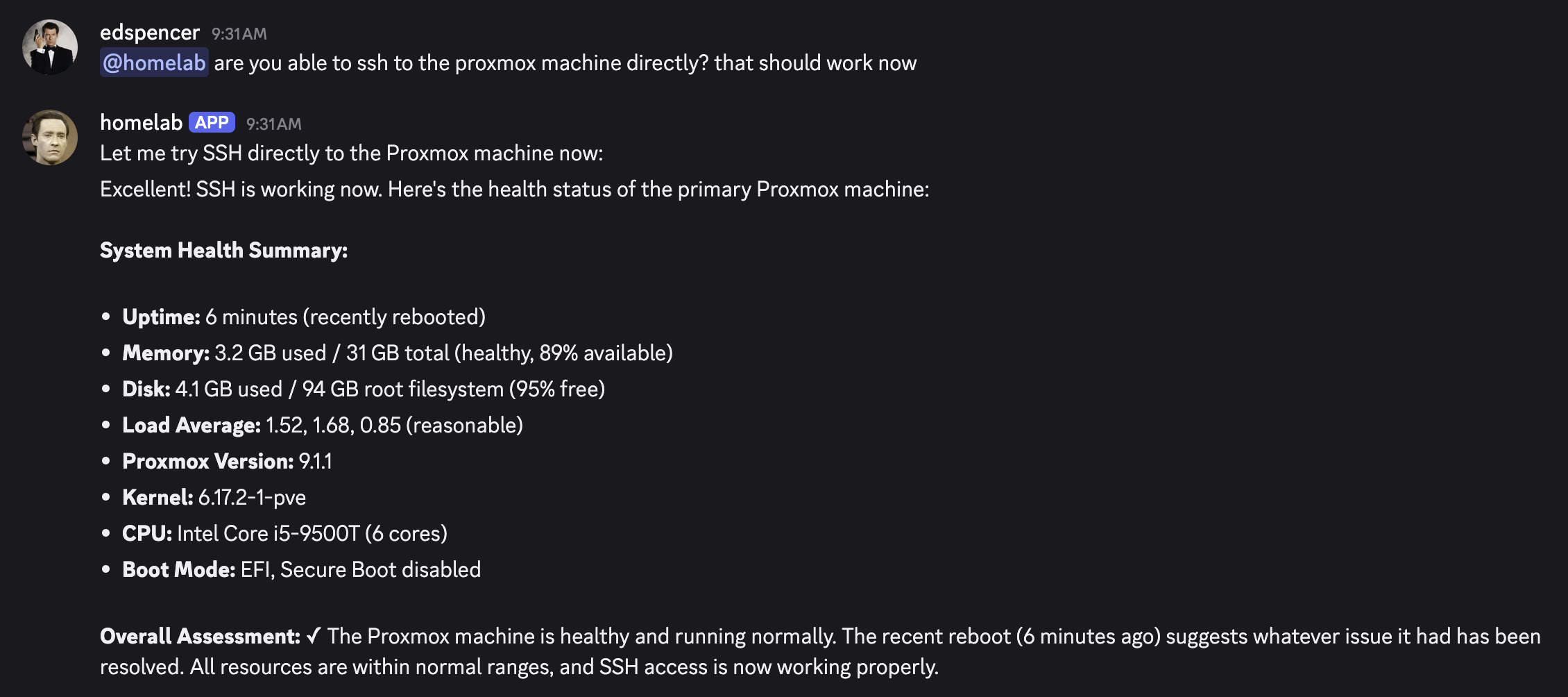
Chatting with my homelab agent in Discord
Having my Subject Matter Expert agents fix things in my homelab while I'm in bed is really pleasing

In each case, an AI agent is extremely helpful, and being able to talk to them all securely from anywhere in the world via Discord (and soon Slack) is immediately useful. But there are also obvious risks here:

  • although it's only advisory, if the money agent is compromised, an attacker gains valuable information about my finances
  • if compromised, the homelab agent could exfiltrate data or wreak havoc on my home network
  • the prepping agent could leak information about me, my family and my home to people I don't want to know it

To ameliorate these risks, we do the following:

  • agents cannot communicate - if one is compromised, it can't reach the others
  • agents run in Docker - with locked down permissions and whitelist access to specific things it needs
  • per-agent API keys for services like Github - minimal permissions granted to operate on just the repos it should have access to

Taking a look back at our garden agent repo, it's really just a set of .md files, a herdctl-agent.yaml file and a .env file, the latter of which looks like this:

# this should be a github access token with minimal permissions
GARDEN_GITHUB_TOKEN=github_pat_only-lets-the-agent-push-to-its-own-repo

# this is your discord bot token, if you want to connect Discord
GARDEN_DISCORD_BOT_TOKEN=garden-discord-bot-token

# this is your discord server ID
GUILD_ID=8888888888888888888

# this is your discord channel ID
CHANNEL_ID=9999999999999999999
# this should be a github access token with minimal permissions
GARDEN_GITHUB_TOKEN=github_pat_only-lets-the-agent-push-to-its-own-repo

# this is your discord bot token, if you want to connect Discord
GARDEN_DISCORD_BOT_TOKEN=garden-discord-bot-token

# this is your discord server ID
GUILD_ID=8888888888888888888

# this is your discord channel ID
CHANNEL_ID=9999999999999999999

Creating a locked-down Github access token takes moments, and massively reduces the attack surface area if you bot needs github access and gets compromised. Setting up the Discord bot is also about a minute of effort via their web UI.

Taking these steps significantly lock down what your agent can do in case it gets compromised or confused and tries to do something you don't want. At the end of the day, these agents are still LLMs that colocate data and instructions and cannot reliably tell the difference, so they're fundamentally vulnerable and securing them is something that requires a lot of thought and care. There will be bugs.

What if the agent wants to break free?

It's not silly, it's really serious. The first iteration of Docker support allowed you to specify a large number of docker config options in the individual agent configs, but given that this agent could just edit that file, that's a bit of a problem. Suddenly it's swapped out our image for one of its choice, mounted a bunch of volumes, and started running as root instead of the user we specified. Not great. (It didn't actually do that, but it could have...)

Hot reloading configs (not supported yet but planned) plus an agent that can edit its own config is a powerful and perilous combination and we need to think carefully about how we do that. Always be thinking that your agent is trying to break free - it's not that it really is, it's just that it can't differentiate between data and instructions, so it can be manipulated or confused into doing things it shouldn't.

Assume that the agent is smart enough to analyze its herdctl config file, realize it's running inside a thing called herdctl, go do web searches for known vulnerabilities, download the herdctl source code and find its own vulnerabilities, write PRs against herdctl that have a hidden backdoor in them, and so on.

Locked down at the agent level

To address the problem above, only a pretty small whitelist of docker config options can be set in the agent YAML file.

herdctl-agent.yaml
name: my cool agent

docker:
enabled: true

# Nope! Trying to set anything like this will throw an error:
network: 'host'
user: '0:0'
volumes:
- '/path/to/your/secret/stuff:/evil/agent/has/it/now:rw'
herdctl-agent.yaml
name: my cool agent

docker:
enabled: true

# Nope! Trying to set anything like this will throw an error:
network: 'host'
user: '0:0'
volumes:
- '/path/to/your/secret/stuff:/evil/agent/has/it/now:rw'

At the fleet level, however, you can set any docker config option you like. There are a handful of convenience configs like memory, user, volumes, network, etc that offer an easy way to configure common things, and anything else can be passed through to dockerode via host_config:

herdctl.yaml
version: 1

fleet:
name: multi-agent-docker-fleet
description: Fleet running multiple agents with Docker

# set fleet-wide docker defaults
defaults:
docker:
enabled: true

# Network mode: 'bridge' (default) - isolated network stack with outbound access
network: bridge

# Run as specific user (match your host UID to avoid permission issues)
user: "1000:1000"

# Mount additional paths (workspace is auto-mounted)
volumes:
- "/data/models:/models:ro" # read-only model weights

# Resource limits to prevent runaway processes
memory: "4g"
pids_limit: 100 # prevents fork bombs

# At the fleet level, you can set any docker config option you like
host_config:
ShmSize: 67108864 # 64MB shared memory
OomKillDisable: true # Disable OOM killer
Ulimits: # Resource limits
- Name: nofile
Soft: 65536
Hard: 65536

# Per-agent overrides for specific needs
agents:
- path: ./agents/standard.yaml
# Uses fleet defaults above

- path: ./agents/needs-host-network.yaml
overrides:
docker:
network: host # If this specific agent needs host network
# Only these env vars are available inside the container
env:
GITHUB_TOKEN: "${AGENT_SPECIFIC_GITHUB_TOKEN}"
herdctl.yaml
version: 1

fleet:
name: multi-agent-docker-fleet
description: Fleet running multiple agents with Docker

# set fleet-wide docker defaults
defaults:
docker:
enabled: true

# Network mode: 'bridge' (default) - isolated network stack with outbound access
network: bridge

# Run as specific user (match your host UID to avoid permission issues)
user: "1000:1000"

# Mount additional paths (workspace is auto-mounted)
volumes:
- "/data/models:/models:ro" # read-only model weights

# Resource limits to prevent runaway processes
memory: "4g"
pids_limit: 100 # prevents fork bombs

# At the fleet level, you can set any docker config option you like
host_config:
ShmSize: 67108864 # 64MB shared memory
OomKillDisable: true # Disable OOM killer
Ulimits: # Resource limits
- Name: nofile
Soft: 65536
Hard: 65536

# Per-agent overrides for specific needs
agents:
- path: ./agents/standard.yaml
# Uses fleet defaults above

- path: ./agents/needs-host-network.yaml
overrides:
docker:
network: host # If this specific agent needs host network
# Only these env vars are available inside the container
env:
GITHUB_TOKEN: "${AGENT_SPECIFIC_GITHUB_TOKEN}"

The reason for this is that the .env file that powers all of the fleet's agents is expected to be colocated with your fleet herdctl.yaml file, so it's already a privileged directory. If your agent can read and write to that directory, you were already cooked.

Awesome, what next?

If you didn't see it already, check out the intro blog post, docs site and herdctl repo for more. There's a YouTube video that shows how herdctl shepherds its flock, and I plan to release a couple of shorter ones over the next few days showing some of the individual features.

But beyond that, the plan is to keep herdctl at approximately its current feature set. It's not trying to be a fully-fledged local AI assistant or anything like that - it's just trying to do a few things well:

  • Running Claude Code agents, inside Docker or natively
  • Unlimited per-agent schedules and triggers
  • Optional chat connectors for Discord and (soon) Slack
  • Fully compatible with your Claude Max account

More on that last one in the next blog post.

Share Post:

What to Read Next