herdctl: an orchestration layer for Claude Code
herdctl is an orchestration layer for Claude Code. It lets your agents run on a schedule, as part of a fleet, and puts them right in your discord or slack channel.
I don't know about you, but I have dozens of Claude Code sessions going at any one time. There will generally be a handful of them that I'm actively paying attention to, and then a long tail of chats that I want to keep around but might not need to look at for a while. But it's really hard to manage 50+ terminal tabs, and it's painful to restore all that state after a laptop restart.
And beyond that, I'm sick of being chained to my laptop. It's not natural. I want to be able to keep hundreds of Claude Code sessions going across any number of projects, and access them from anywhere, in a modern UI that doesn't hurt my middle-aged eyes. I need a Paddock to put my herd of Claudes in.
Paddock is a thin wrapper around Claude Code. As well as solving Claude Code terminal tab hell, it brings some powerful features that Claude Code really ought to have:
It works with your Claude Max plan (and dear god will it drain that thing dry), and it frees Claude Code from the confines of a single machine. The best way to run it - the way I run it - is on a dedicated small server in your house. You can totally run it on your laptop if you want, but having Claude Code running on a 24/7 box that you can access from any laptop or phone is a game changer.
Paddock is a thin wrapper around Claude Code. That's all it ever wants to be. It is not trying to be your AI agent, it's just a prettier and more durable face for Claude Code. It's entirely open source, it does not want your money or your data, and there is no commercial angle. It's perfect for home-labbers and I have half a dozen instances of it running myself.
A single Paddock instance can host as many Claude Code chats as you like, either at the root or inside Projects. My main Paddock deployment is my projects box, which uses the devbox Docker image and has all of the code projects I'm currently working on.
Paddock has first class git support: the Paddock instance as a whole can be sync'd with a backing git repository, but Paddock also supports Projects, which can also be git-backed. This has been a great way to work on multiple projects simultaneously.
Paddock isn't only aimed at software engineers, but running on the devbox image lets my Claude Code instances deploy local instances of software and test it with Playwright MCP, pinging me with a link to review when it's done. It can also send you a video if you ask.
Almost all of Paddock has been built with Paddock itself - I almost never open Claude Code any more. Here's an example of a video that I had Paddock send me of it working on itself - in this case making the sub-agent streaming UX better:
In the last few weeks I have put hundreds of chat sessions through Paddock, with the majority of them going on my projects deployment. I will make a followup post/video about that shortly as it's easier to demonstrate with a video than text. The project is still immature and has a user base of 1 at the moment, but for me it's a step change up from vanilla Claude Code, and the shape of things to come.
There are five things I use constantly and would badly miss if I went back.
This is the one I'd keep if I could only keep one. You're deep in a conversation and it turns out there are three separate jobs on the other side of it — fix the bug, update the docs, write the post. Rather than doing them one at a time in the same chat, or losing the context by starting fresh, you just ask for child chats and Paddock opens one per job.
The crucial part is what those children are. A sub-agent does its work out of sight and hands you a summary. A chat Paddock opens is just a chat: it appears in the sidebar under its parent, you can watch it stream, stop it, and reply to it. They can go into other projects too, which is how a conversation in one repo kicks off work in another.
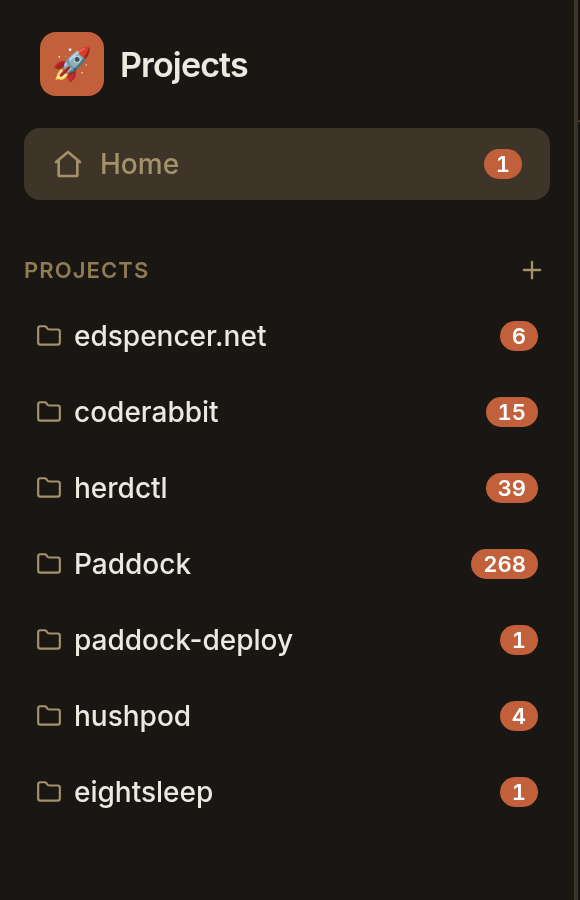
Every project carries an unread count, so I can leave a dozen chats working and come back to whichever ones have actually replied. Paired with the running indicators — the video near the top of this post shows five agents draining their queue at once — it means I never have to go hunting for what finished.
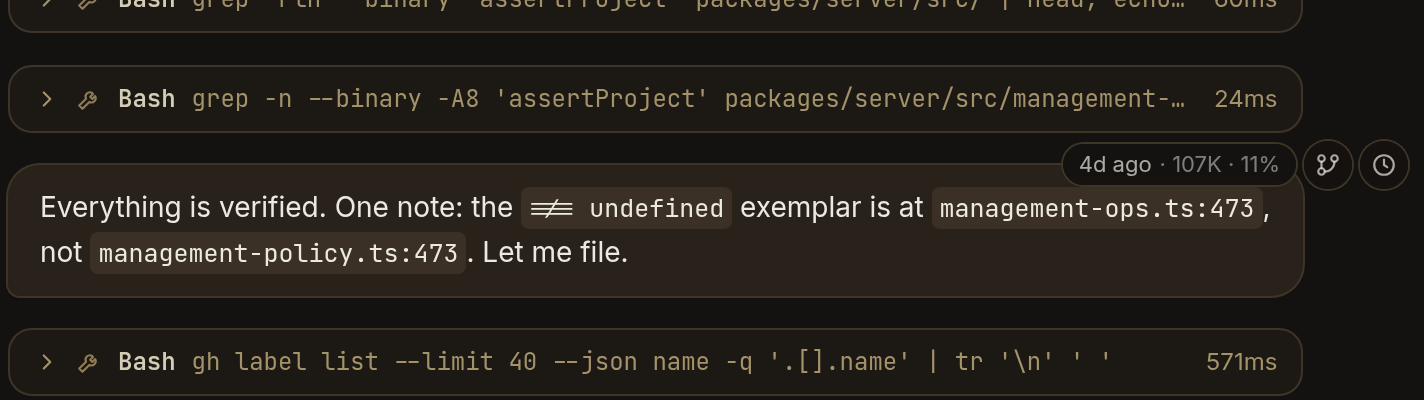
Hover any message and a small rail appears telling you how long ago it was and how full the context window was at that point. Click the branch icon and you get a new chat carrying the conversation up to exactly there, with the original left untouched. Not just from the end — from anywhere. It's the escape hatch for a chat that went off the rails twenty messages ago, and for trying two approaches from the same starting point.
Above the composer, at all times: how full the context window is, and what the conversation would have cost at API rates. I'm on a Max plan so I'm not actually paying per token, which makes the number more interesting rather than less — it's a running tally of what I'd have spent. They get big.

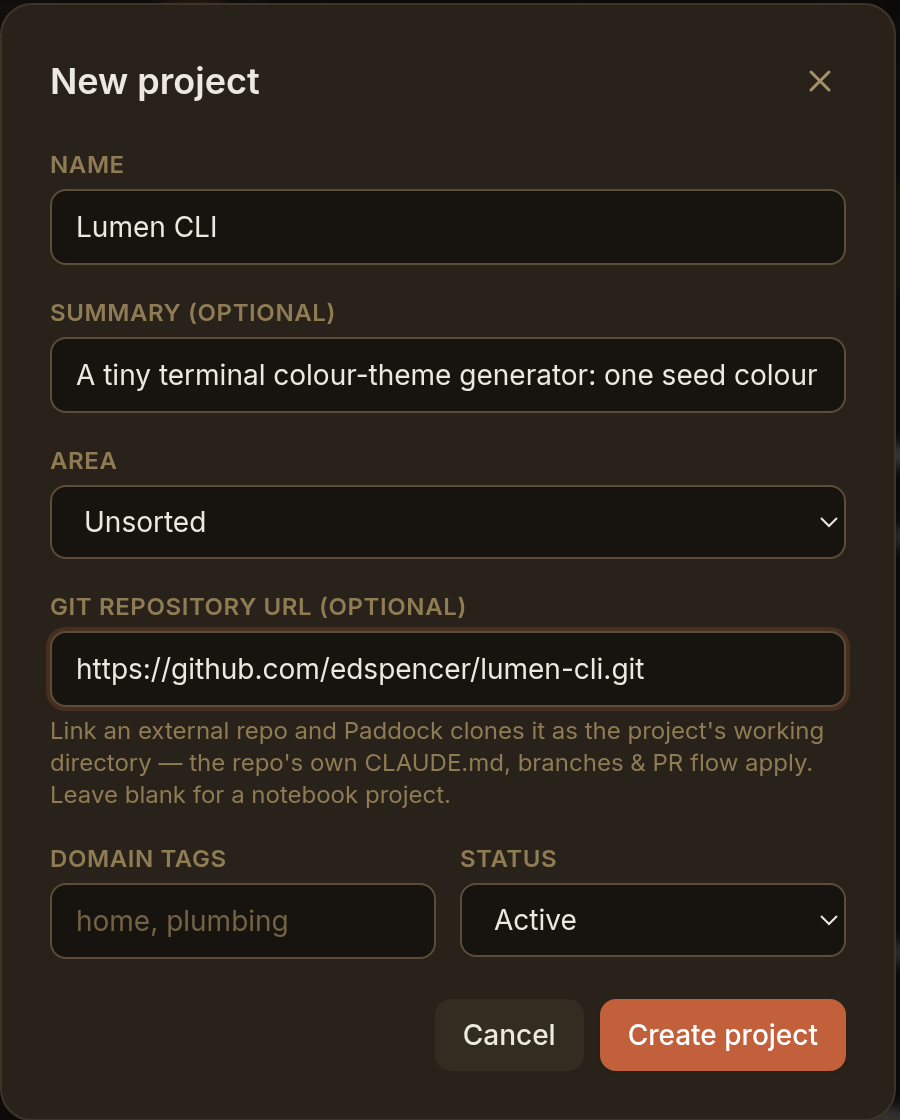
A project can be linked to a git repo, and Paddock clones it as that project's working
directory. Everything then behaves the way it would locally: the repo's own CLAUDE.md
is picked up, skills and settings apply, branches and PRs work normally. It's the
difference between an agent that knows your conventions and one you have to re-explain
them to every time.
Leave that field blank and you get a notebook project instead — a plain directory for notes and planning, which is how a lot of mine start. The root of the instance can be git-backed too, which is how I keep notes and configuration versioned across a whole Paddock rather than per project.
Paddock is available on GitHub at github.com/edspencer/paddock, and there's more information available on the project page.
There's a wealth of information on the paddock-deploy repo, with recipes for how to deploy Paddock onto Proxmox, Docker, Kubernetes, and other platforms. Honestly, just point your Claude Code at that and tell it to do it for you - that's basically what I do.
Although I recently added support for importing existing Claude Code sessions (e.g. if you wanted to run Paddock on a machine you've already used for Claude Code sessions), that's still kinda beta and I really recommend you spin up a permanent instance on something like Proxmox.
herdctl is an orchestration layer for Claude Code. It lets your agents run on a schedule, as part of a fleet, and puts them right in your discord or slack channel.
Paddock: browser tabs for Claude Code
Explore Paddockherdctl runs Claude Code agents securely in Docker, with schedules and chat
Learn more
Paddock is browser tabs for Claude Code — persistent, resumable sessions, organized by project
→ Read more
herdctl runs Claude Code agents securely in docker, with optional schedules and chat
→ Read more
mdx-prompt lets you write reusable and composable LLM prompts using JSX
→ Read more
bragdoc.ai is an open source Next JS AI SaaS app for tracking your work
→ Read more
react-auto-intl automatically internationalizes and translates React and Next JS apps
→ Read more
NarratorAI creates AI-powered content like intros and search result summaries
→ Read more
InformAI allows AI to access and understand the information in your React components
→ Read more
ReadNext creates AI-powered content recommendations for your blog or other content
→ Read moreI've built things on the web for 20 years, and used JavaScript before it was cool.
I've been working for myself since early 2023, going wherever my heart takes me - mostly playing with AI and UI.